|

August 2009
For Microsoft Access, SQL Server,
Visual Studio .NET, and VB6 Professionals
 Hi
Everyone, Hi
Everyone,
Our development continues to work on existing and new projects across
all our technologies. This month, we're pleased to release new versions
of Total Access Detective for our Access 2003 (and earlier) customers,
along with updates to our Total Access Statistics and Total Access Admin
products.
We've received a lot of interest recently with questions and projects
associated with migrating data from Access to SQL Server. We've included
several tips around this issue along with a reminder of our
Microsoft Access to SQL Server Upsizing Center and
available services.
Finally, in a completely separate venture from our Office/Access and
developer solutions, we offer some resources for how our Sentinel
Visualizer program applies Social Network Analysis to the needs of
commercial and government entities.
Best wishes,
Luke Chung
President
Contents
Product Feature: Total Access Emailer
Total Access Emailer
lets you create personalized emails to everyone on your list. Easily
customize your subject and message, add data specific to each recipient,
and even send them their reports. Send text or HTML message with
embedded graphics. The Access 2007 version even lets you attach your
Access reports as PDF files filtered for each recipient.
 Now
Shipping: Total Access Detective X.7 Now
Shipping: Total Access Detective X.7
for Access 2003, 2002
and 2000
Total Access Detective is the most powerful database, object, code,
and text comparison product for Microsoft Access. With the recent
release of
Total Access Detective for Access 2007, we've also enhanced it for
Microsoft Access 2003, 2002, and 2000. If you need to know exactly what
changed between any two Access objects or databases, Total Access
Detective is for you.
We're pleased to provide new versions for Microsoft Access 2003,
2002, and 2000 (versions 11.7, 10.7 and 9.7 respectively). Version X.7
adds many
new features including data comparison between two queries, enhanced
data comparison options such are comparing two tables when field names
are not identical (compare only identical field names or on field
order), using the first field as the key field if no key field exists,
skipping small numerical data differences, ignoring case differences
between modules, improved support for ADP comparisons, etc. Existing
customers can upgrade for a nominal fee.
Existing Total Access Detective customers under annual support
contracts receive the upgrade for free.
Free Updates for Total Access Statistics 2007 and Total
Access Admin 2007
As part of our commitment to quality software, FMS
periodically releases updates patches to add new enhancements and
resolve known issues. Most recently, we released updates for these
products:

Total Access
Statistics is the most powerful data analysis program for Microsoft
Access. Extend the power of Access queries with advanced analysis such
as percentiles, frequency distributions, moving averages, t-Tests,
confidence intervals, ANOVA, data normalization, and much more. Version
12.00.0009 is now available for Access 2007 and includes improved
support for ADPs and certain calculations.

Total Access
Admin 2007 lets you monitor multi-user entries and exits to your
Access databases in real-time. Watch and log the activity and catch
suspect connections or drops that can cause database corruption. It can
even compact your database after everyone has exited. This patch
addresses some of the issues associated with supporting password
protected databases and databases under workgroup security. (Version
12.00.0140)
These updates are available free of charge to registered
owners of Total Access Statistics 2007, version 12.0 and Total Access
Admin 2007. Notification and download instructions for receiving the
patch were emailed to registered owners. If you did not receive
instructions, please
contact us
so we can update your information.
 Tip
for Access 2007: Use "Check for Truncated Number Fields” for Partially
Displayed Numerical Values Tip
for Access 2007: Use "Check for Truncated Number Fields” for Partially
Displayed Numerical Values
In Access 2003 or earlier, you may have seen truncated
numbers on forms or reports, and not realized that you weren’t seeing
the full value. Access 2007 includes a new option to
check for truncated number fields and display pound signs (#) to
indicate that the entire value is not shown.
 Paper
for Error Handling and Debugging Tips for Access, VBA and VB6 is
now on MSDN Paper
for Error Handling and Debugging Tips for Access, VBA and VB6 is
now on MSDN
 Originally
published as one of our technical papers (Error
Handling and Debugging Tips and Techniques for Microsoft Access, VBA,
and Visual Basic 6 (VB6), Microsoft has now added it to their MSDN
site. Check it out
here. Originally
published as one of our technical papers (Error
Handling and Debugging Tips and Techniques for Microsoft Access, VBA,
and Visual Basic 6 (VB6), Microsoft has now added it to their MSDN
site. Check it out
here.
Tip
for Access 2007: Importing Access 2007 Tables into SQL Server
Microsoft SQL Server 2005 offers the Import and Export
Wizard to move data from one source to a destination. With the Import
and Export wizard, you can access different types of data sources. These
sources include other database formats such as
Microsoft Access, Microsoft SQL Server, flat files, Microsoft Excel or
Oracle database.
Tip
for Access 2007: Errors Importing Data from a Microsoft Access 2007
Format (*.ACCDB) File into SQL Server
While attempting to import an Access 2007 format database (*.ACCDB), you
may receive an error such as: Unrecognized Database Format or Could not
find installable ISAM.
These errors can occur if you do not have the appropriate driver
installed to import data from ACCDB files.
Importing Microsoft
Access MDB databases into SQL Server is a built in feature of SQL
Server. However, because of the difference between the
database engine of Microsoft Access 2007 and earlier versions of
Microsoft Access, it is not possible to connect to the Access 2007
database using the built-in data source “Microsoft Access”. You can use
this if you wish to
import data from a MDB format, but not an ACCDB from Access 2007.
 Microsoft
Access to SQL Server Upsizing Resources and Services Microsoft
Access to SQL Server Upsizing Resources and Services
 We
continue to see many people trying to migrate your
Microsoft Access applications to SQL Server. Whether
you're doing it yourself or want our assistance, we're
here to help. Visit our
Microsoft Access to SQL Server Upsizing Center or
contact our
Professional Solutions Group to have us bid on your
project. We
continue to see many people trying to migrate your
Microsoft Access applications to SQL Server. Whether
you're doing it yourself or want our assistance, we're
here to help. Visit our
Microsoft Access to SQL Server Upsizing Center or
contact our
Professional Solutions Group to have us bid on your
project.
 The
Next Generation in Data Visualization and Analysis The
Next Generation in Data Visualization and Analysis
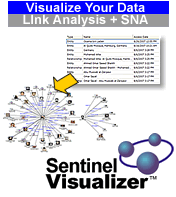
Sentinel Visualizer from our
Advanced Systems Group
provides an entirely different way to manage, view and understand data
with complex relationships. One of its most important features is
Social Network Analysis (SNA).
Did you know that Social Network Analysis can help you get more
information from your data? Read about how organizations are using
Social Network Analysis today to make better informed decisions and
generate new opportunities.
Thank you for your continued interest in FMS, Inc.
|

Microsoft Exchange Server Training Portal
Take advantage of the new Microsoft Exchange Server 2010
training resources and
become an expert.
________________
TechNet Evaluation Center
Explore and evaluate great Microsoft products for your company
Register for the free download and then check your
email for convenient resources that enhance your evaluation
experience.
________________
Microsoft Office 2007 Service Pack 2 Released
Details of the update are in this
knowledgebase article.
Existing owners can download SP2 for free from
Microsoft.
________________
Bing: Microsoft Search
Get the right information to make the right decisions.
Try it today
|
Resources
Your Opinion Matters
Our newsletters are designed for you, the FMS customer.
To help us provide better service, we encourage you to send
us your suggestions and comments about "The Buzz", as well
as our products and services.
We are constantly trying to improve the quality of our
service to you, and your input is invaluable.
See something useful and you'd like to see more of it?
Want more Microsoft updates?
Please let us know what you want to see. Simply
email us
with suggestions, comments, or requests.
|
Past
Issues of the BUZZ Archived for You
Have you missed a past issue of
the popular FMS "The Buzz" email newsletter?
You'll find recent past issues
conveniently archived for easy retrieval. Get all the
tips and product news, plus bug fixes and more!
Get all the news that's fit to
email!
|

Sign Up or
Change Your
Address
|



 Email Newsletter
 Developer Team Blog
 Facebook
 Twitter
 Support Forum
 Demos
Demos Microsoft Access
Developer Help Center
Microsoft Access
Developer Help Center Microsoft Access
Query Help Center
Microsoft Access
Query Help Center

 Technical Papers
 Tips and Techniques
 Videos






 Newsletters
