Total SQL Analyzer PRO Product Guide
FMS is pleased to provide you with this Product Guide to assist in your evaluation of this exciting member of the FMS family of development products.
Contents
Introducing Total SQL Analyzer PRO
Super-Charge SQL Server with Total SQL Analyzer PRO! It provides
in-depth analysis of an entire Microsoft SQL Server system,
including performance optimizations, configuration problems and
best-practices suggestions, an interactive object dependencies
diagram, and complete documentation of all objects.
Total SQL Analyzer PRO can generate a thorough, easily-navigated
analysis with the click of a mouse. There is no way a developer or
database administrator can accomplish this without spending hundreds of
hours of effort on the analysis of one server, and it just would not be
economically feasible. Total SQL Analyzer PRO can provide this
information for an unlimited number of servers and can save an unlimited
number of analyses for each server. These results represent an audit
trail of configuration, schema, and the state of a Microsoft SQL Server
system over time. This kind of information is invaluable for pinpointing
scalability problems, to aid in disaster recovery, and for many other purposes.
Overview
Implemented as a Windows-based application, Total SQL Analyzer PRO includes the following functionality:
- Analysis of over 120 performance optimizations and configuration and design issues.
- Interactive object dependencies diagram.
- Over 70 high quality reports of all analysis and documentation generated. All
reports can be printed, or saved in HTML or Microsoft Word format.
- Job definitions that allow you to specify the server and objects to
analyze. Jobs can be saved and run on demand or scheduled for non-peak times.
- Analysis results are automatically saved every time a job is run, allowing
chronological reviews of changes to every system analyzed.
Key Features and Benefits
|
Feature |
Benefit |
|
Improve performance and scalability
|
- Detects over 120 issues in your servers and databases.
- Specific optimization tips are generated for any queries that could benefit.
- Tables without clustered indexes are detected.
- Use of cursors is flagged.
- Potential column data types that can be optimized.
|
|
Improve reliability and maintainability |
- Identifies design problems and suggests best practices.
- Includes the following: tables without primary keys, handling of null values
that do not confirm to ANSI specifications and identically named columns among
all tables with different data types.
|
|
Develop applications faster |
-
See dependencies among objects that can be printed or saved in HTML or MS Word
format.
-
Includes the following: Interactive diagrams showing where objects are used and
the objects used by other objects.
-
See where tables are used by views, stored procedures and user-defined
functions.
-
See which tables, views and user-defined functions are used by a given stored
procedure.
|
|
Understand and manage your project |
-
Generate comprehensive documentation. Powerful Documentation Explorer to
browse, filter and compare object properties.
-
Snapshot of all object scripts is saved and can be viewed.
-
Audit trail of configuration changes to a server over time.
-
Over 70 well-structured, filterable reports for all schema and properties which
can be printer or saved as HTML and MS Word format.
|
Technical Information
In the process of evaluating any software solution, you must
evaluate the features and how they translate into benefits for your
organization.
Analysis of configuration and schema design that can negatively
affect performance and scalability
Attempting to ferret out all of the potential configuration and design
problems among hundreds or thousands of tables, views, stored
procedures, user defined functions, columns, triggers, constraints, and
other objects is just not possible. Microsoft SQL Server has hundreds of
settings to control all aspects of performance, security, and
management. These settings are stored in many places, including system
tables, the Windows registry, and in objects directly in the Microsoft
SQL Server installation. Although Microsoft SQL Server provides a rich
array of tools for creating objects, there are often cases where design
decisions you make may result in issues as you deploy your databases.
Total SQL Analyzer PRO can analyze all of these objects and alert you
to over 120 different performance tips and issues that you just wouldn’t
be able to find, and provides recommendations to correct these problems.
The complete list of performance tips and issues is as follows:
Performance Tips
Server
- AWE is off.
- Max degree of parallelism is set to the default (0).
- Max worker threads is set to the default (255).
- Min memory per query is set to the default (1024).
- Network packet size is set to the default (4096).
- Priority boost is set to the default (0).
- Query timeout is set to the default (-1).
- Query wait is set to the default (-1).
- Recovery interval is set to the default (0).
- Server RAM should be at least 256 mb.
- Time slice setting is set to the default (100
milliseconds).
- Temp database located on server’s data drive.
Databases
- AutoShrink should be off for production databases.
- Consider locating tempdb on its own separate physical
drive.
- Database growth increment of 10% or less may be too small.
- Transaction Log growth increment of 10% or less may be too
small.
- Update statistics is on.
Tables
- Avoid using the sql_variant datatype.
- Char datatype allows null data.
- Clustered index is not based on a single, narrow, column.
- Computed column performance tip.
- Consider adding an index for this column if it is used in a
WHERE or ORDER BY operation.
- Consider disallowing NULL values in this column.
- Consider not having a clustered index on this column if it
has incremented data (id, date, etc.) and is subject to a
high number of INSERTs.
- Consider using a fixed-length character data type for this
column.
- Consider using varchar, char, nchar, or nvarchar instead of
text or ntext data types in this column.
- Do not use float or real data types for primary keys.
- Duplicate indexes found for column.
- Identity column in primary key is a unique identifier.
- If a trigger functions as a constraint, consider using a
constraint to perform the same task.
- Non-unique index.
- Primary key is a clustered index.
- Table does not have a clustered index.
- Unicode datatype found (nchar, nvarchar, or ntext).
Views
- Consider creating indexes for temporary tables.
- Consider indexing columns used in DISTINCT clause.
- Consider indexing columns used in GROUP BY clause.
- Consider indexing columns used in ORDER BY clause.
- Consider indexing columns used in TOP clause.
- Consider indexing columns used in WHERE clause.
- Consider using a derived table instead of a temporary
table.
- Consider using UNION ALL instead of UNION if duplicate
values are OK.
- Data conversion function found in the WHERE clause.
- DISTINCT clause found in view.
- IN clause found in view.
- Min() and Max() - columns used by these functions should
have an index.
- Non-indexed view.
- ORDER BY found in view.
- SELECT * found in views.
- SELECT with HAVING clause may have issues.
- SELECT...IN clause performance tip.
- SOUNDEX function may have issues.
- SUBSTRING function found in WHERE clause.
- UNION found.
- WHERE clause not found in view.
- WHERE clause with AND operator performance tip.
- Wildcard characters found at the beginning of a word using
the LIKE keyword.
Stored Procedures
- Consider creating indexes for temporary tables.
- Consider indexing columns used in DISTINCT clause.
- Consider indexing columns used in GROUP BY clause.
- Consider indexing columns used in ORDER BY clause.
- Consider indexing columns used in TOP clause.
- Consider indexing columns used in WHERE clause.
- Consider using a derived table instead of a temporary
table.
- CURSOR found in stored procedure.
- Data conversion function found in WHERE clause.
- GROUP BY with no aggregate clause.
- IN clause found in stored procedure.
- Min() and Max() - columns used by these functions should
have a clustered index.
- ORDER BY found in stored procedure.
- SELECT * found in stored procedure.
- SELECT DISTINCT found in stored procedure.
- SELECT INTO found in stored procedure.
- SELECT with HAVING clause may have issues.
- SELECT...IN clause performance tip.
- SET NOCOUNT ON not found in stored procedure.
- SOUNDEX function may have issues.
- Stored procedure name begins with sp_.
- SUBSTRING function found in WHERE clause.
- WHERE clause not found in stored procedure.
- WHERE clause with AND operator performance tip.
- Wildcard characters found at the beginning of a word using
the LIKE keyword.
-
WITH RECOMPILE not found in stored procedure.
- WITH RECOMPILE option in stored procedures can cause
performance problems.
User Defined Functions
- Consider indexing columns used in DISTINCT clause.
- Consider indexing columns used in GROUP BY clause.
- Consider indexing columns used in ORDER BY clause.
- Consider indexing columns used in TOP clause.
- Consider indexing columns used in WHERE clause.
- CURSOR found in user-defined function.
- Data conversion function found in WHERE clause.
- DISTINCT clause found in user-defined function.
- IN clause found in user-defined function.
- Min() and Max() - columns used by these functions should
have an index.
- ORDER BY found in user-defined function.
- Scalar user-defined function performance tip.
- SELECT * found in user defined function.
- SELECT with HAVING clause may have issues.
- SELECT...IN clause performance tip.
- SOUNDEX function may have issues.
- SUBSTRING function found in WHERE clause.
- UNION found.
- WHERE clause not found.
- WHERE clause with AND operator performance tip.
- Wildcard characters found at the beginning of a word using
the LIKE keyword.
Issues
Server
- Allow updates should be turned on.
- ANSI Nulls setting is off.
- Auto update statistics is off.
- Identically named columns with different data types
detected.
- Lock Timeout has not been changed from its default value
(-1).
- Max async i/o has not been changed from its default value
(32).
- sa
user with no password.
- The max size for all databases on a server hard disk
exceeds the size of that disk.
- The
model database's size is larger than the server's remaining
free disk space.
Databases
-
Compatibility level should be set to the current version.
- Consider
making the database read-only if it is only used for
retrieval of data.
- Database
has no user-defined file group.
- Database
name contains spaces.
- Multiple owners exist for database object.
- The
database and its transaction log share a physical drive.
Tables
- Check
constraint is disabled.
- Identity
column may have issues.
- IMAGE
column may have issues.
-
Smalldatetime data type is not compatible with Visual Basic.
- Table
does not have a primary key.
- Table
name contains spaces.
- Text or
ntext datatype found.
- Trigger
is disabled.
Views
- ANSI
Nulls Status is False.
- View
name contains spaces.
Stored Procedures
- Stored
procedure name contains spaces.
- Stored
procedure was created with ANSI NULLS off.
User Defined Functions
- ANSI
Nulls Status is False.
- SELECT
INTO found in user-defined function.
-
User-defined function name contains spaces.
Because Total SQL Analyzer PRO's analysis is so comprehensive, you
can finally see both big picture and detailed analysis about your
database systems. This information is invaluable in many scenarios:
- To troubleshoot performance and scalability problems
-
When you need to migrate objects and applications
from server to server
- As you find that undocumented changes have appeared in you
system over time
Total SQL Analyzer PRO provides complete documentation of object
schema
Even small Microsoft SQL Server installations contain hundreds of
objects made up of hundreds of properties, scripts, and settings.
The schemas and meta data that define objects are the critical
roadmap developers and administrators rely on. This information is very
useful in many scenarios, including the following:
- As developers create applications that use Microsoft SQL
Server, they need access to current schema information.
Total SQL Analyzer PRO provides this in the reports that can
be printed or exported--data you can include on your
intranet or send via email.
- As object schema is changed over time, it is critical to be
able to identify differences. By running Total SQL Analyzer
PRO at regular intervals, you can rely on having detailed
schema information before and after changes.
- When you need to provide printed or electronic
documentation to a client, IS department, or another group
within your organization.
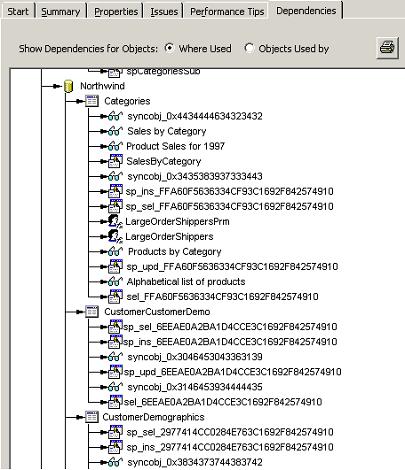
Interactive Object Dependencies diagram
All object dependencies are documented and represented in an
easy-to-navigate, printable diagram. You can view dependencies among
objects in two ways:
- Where Objects are Used – shows objects that use an
object. For example, a table is shown above a list of
objects that reference that table (e.g., stored procedures
and views that use the table).
- Objects Used by an Object – displays a list of all
objects that are directly used by an object. For example, a
stored procedure will contain all objects that it uses
(e.g., tables, user defined functions, etc.).
Below is a screen shot of a small section of the dependency diagram
showing where objects are used:
Over 70 presentation-quality reports are included
Because of the amount of information Total SQL Analyzer PRO provides,
you need a way to get a clear, concise overview of your system. Total
SQL Analyzer PRO includes over 70 reports that allow you to view
configuration and schema data grouped and sorted in a variety of ways.
Additionally, all reports can be printed, or exported to HTML of
Microsoft Word for inclusion in other systems or processes.
Total SQL Analyzer PRO provides a powerful documentation explorer
In addition to the reporting tools, Total SQL Analyzer PRO also
provides the Documentation Explorer, which uses the familiar look and
feel of Windows Explorer. You can navigate through Microsoft SQL Server
information using a familiar treeview, and see summary, property, and
issues as well as performance tips for each object analyzed.
Additionally, you can filter properties to see all values across a
specific set of object. This is very useful when you want to perform
consistency checking.
Jobs can be defined and re-run at any time
To get Total SQL Analyzer PRO to generate information about a Microsoft
SQL Server installation, you simply run the Job Wizard to define which
server, objects, and options you want to include. You can create any
number of customized jobs, and re-run them at any time. Total SQL
Analyzer PRO also includes a scheduler so you can easily run Jobs when
your server load is at its lowest.
Job results are saved
Because Total SQL Analyzer PRO saves Job results on disk, you can
choose to save specific documentation and analysis over time. This makes
it easy to see how objects have changed over time.
Total SQL Analyzer PRO supports all editions of Microsoft SQL
Server 7 and Microsoft SQL Server 2000
Because Total SQL Analyzer PRO supports all editions of Microsoft SQL
Server 7 and 2000, you only have to work with one product to get the
information you need across your entire enterprise.
Sample Reports
Quickly Understand the Big Picture with Top-Level Summary
Reports
If you develop applications in today's rapid-pace world, your
number one concern is meeting your deadlines. Total SQL Analyzer PRO
provides specific concrete benefits that help you meet your goals.
One of the key problems in developing with SQL Server is that, as
your applications grow, it can be difficult to see the forest for the
trees. You need to see the big picture in order to make top-level
decisions about design and work loads. Total SQL Analyzer PRO provides
targeted summary reports to give you exactly this information.
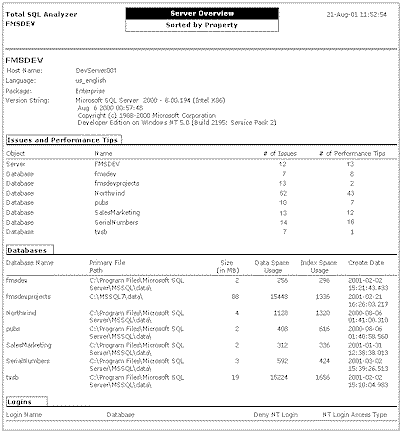
The Server Overview shows the big picture of your server and its
objects.
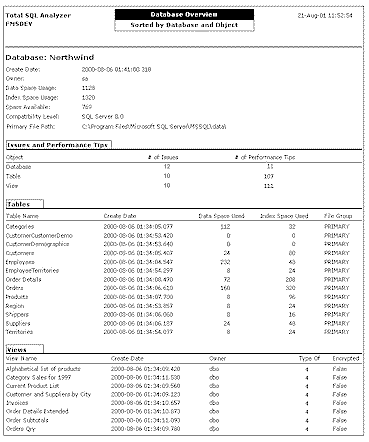
Use the Database Overview to see the big picture of your databases.
Understand Individual Objects with Drill-Down Detail Reports
The second important problem with SQL Server is that you need
detailed information about specific objects. Total SQL Analyzer PRO
allows you to drill down to the lowest level to see how tables,
views, stored procedures and other objects are actually constructed.
This low-level information can dramatically reduce your development
time by providing you with a roadmap that helps you write your
applications faster.
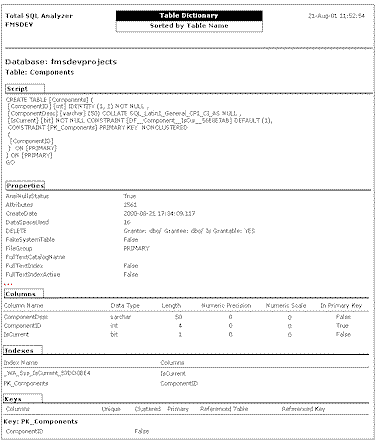
The Table Dictionary shows you everything you need to know about
tables.
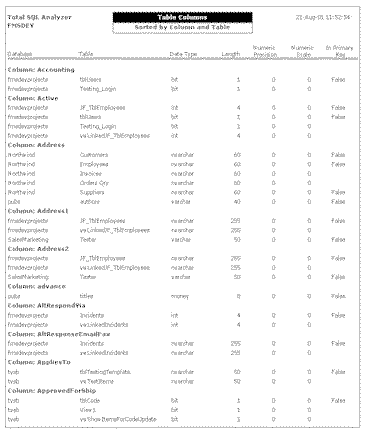
Use the Field List to see fields across tables.
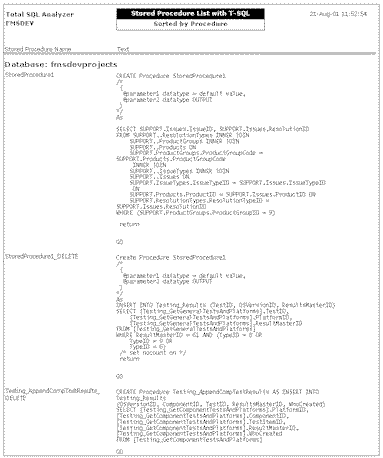
Deliver More Reliable Applications by Detecting Errors and
Omissions
Your mandate as a developer is a tough one: not only are you expected
to deliver applications on a tight schedule, you are expected to
deliver solutions that perform quickly and have few errors.
Unfortunately, the task of digging through SQL Server to detect
performance problems, data inconsistencies, and potential errors is
a long arduous process. Let Total SQL Analyzer PRO do the work for
you.
Total SQL Analyzer PRO scans all server and database objects and
properties to detect hidden performance problems. Performance problems
can occur when properties are set to non-optimal values, or default
server settings are not modified to reflect how your applications work.
Now you can find these potential issues in minutes instead of days.
Even simple SQL Server installations can contain object definitions
and property settings that may cause errors in your applications.
Total SQL Analyzer PRO checks objects and settings against a
database of known potential errors and omissions.
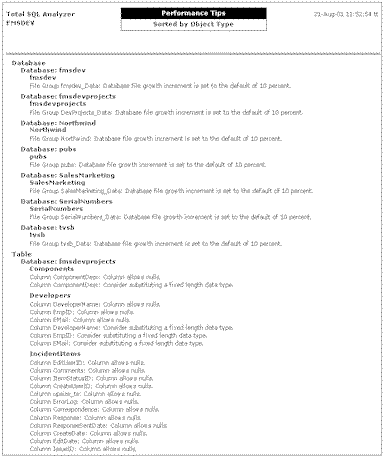
Use the Performance Tips report to see hidden performance problems.
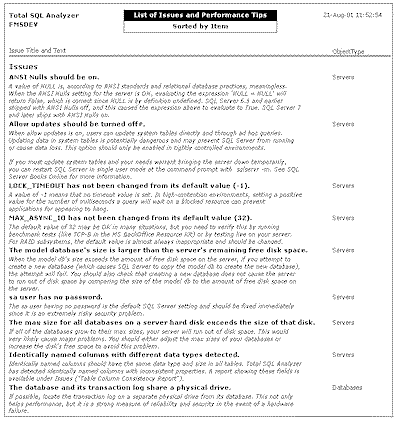
The Issue Reports show potential errors and problems in your server
and database objects.
Ensure Data Consistency and Integrity
As tables and fields multiply, the chance for mismatched data
types increases. A simple matter of a key field duplicated in a
child table with a different data type can lead to data
inconsistencies and possible data loss or corruption. Mapping data
types between fields with the same names across tables is the only
way to find these consistency issues. Total SQL Analyzer PRO does
this for you automatically, by providing documentation of field data
types across objects and showing inconsistent data types.
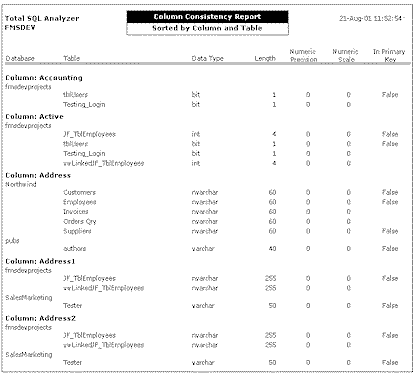
Use the Column Consistency Report to find problems that may lead to
data loss or corruption.
Other consistency and integrity issues arise when property values
differ among related objects. For example, if you have multiple
tables that all deal with an OrderID field, you should ensure that
the property values are consistent across all instances of the
field. Total SQL Analyzer PRO solves this problem for you by
providing reports of property values across objects.
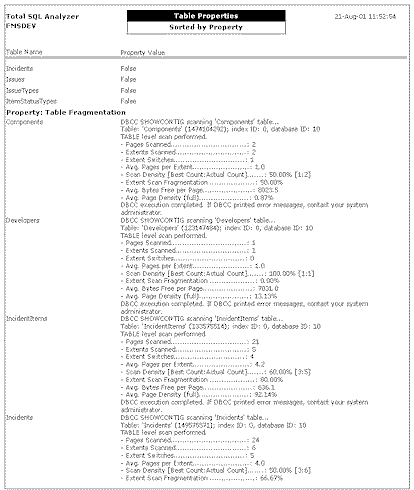
Use reports sorted by Property Name to find inconsistencies and errors.
General Information
System Requirements
Total SQL Analyzer PRO has the following system requirements:
- Windows 98, ME, NT
4.0, 2000, XP, Vista, or later
- Processor: Pentium
II or better
- 64 MB RAM
- 20 MB free disk
space for installation
Product Packaging
Total SQL Analyzer PRO ships
on CD, and includes a printed User’s Guide, extensive online help, and
an automated installation program.
Technical Support
Free 30 day technical support is available by phone, fax, email, and on our web
site. Additional premium support options available.
Licensing and Pricing
Total SQL Analyzer PRO is licensed on a per-user basis. Each user who
runs the program must own a license. Pricing is as follows:
Total SQL Analyzer PRO can be purchased directly from
FMS, corporate resellers, and international
distributors. All FMS products offer a 30-day money back
guarantee.
Total SQL Analyzer PRO vs. Total
SQL Analyzer
Total SQL Analyzer PRO is an enhancement to the original
Total SQL Analyzer program, now called the standard
version. The standard version of Total SQL Analyzer
provides extensive documentation of SQL Server
configurations and databases.
Total SQL Analyzer PRO builds on the standard version with extensive
analysis of servers and databases to suggest ways to improve performance
and adopt “Best Practices”. Over 100 types of issues are checked against
your system, many of which would be very difficult or time consuming to
find manually. Documentation of dependencies is also added along with a
powerful interactive Dependency Viewer that lets you navigate through
multi-level object relationships.
If you simply want documentation of your server and databases, get
the standard version of Total SQL Analyzer. If you want detailed
analysis, improvement suggestions, and dependency information, get Total
SQL Analyzer PRO.
| Feature |
PRO |
Standard |
| Performance Analysis: Number of performance
tips found. |
99 |
0 |
| Best Practices Analysis: Number of issues
that pinpoint design and maintainability problems. |
29 |
0 |
| Object Documentation:
Comprehensive documentation of all server and database objects,
properties, and settings. |
 |
|
| Dependency Documentation:
See dependencies among tables, view, stored procedures, user defined
functions, triggers, and check constraints. |
|
X |
| Interactive Dependency Viewer: Navigate
through dependencies to see how objects reference each other. |
|
X |
| Integrated Start Page: Easily manage results
and get more information. |
|
X |
| Documentation Explorer: View documentation
results organized in a tree view hierarchy. |
|
|
| Schedule Documentation: Define jobs and
re-run them at any time. |
|
|
| Presentation Quality Reports |
|
|
| Share Information: Print reports or export to
HTML or Word format. |
|
|
Additional Resources
If you need more information or additional materials, please feel
free to contact us:
FMS Inc.
Phone: 703-356-4700
Email:
sales@fmsinc.com
Web:
www.fmsinc.com
Conclusion
While developing in SQL Server, there are many operations that are
tedious and error-prone. Total SQL Analyzer PRO allows you to
evaluate and see all the processes. With its ingenious set of
performance tips, Total SQL Analyzer PRO will increase the your
productivity and improve every project.
Thank you again for taking the time to review Total SQL Analyzer PRO.
We invite you to put the product through its paces, and contact us if we
can provide any additional assistance in evaluating or deploying Total
SQL Analyzer PRO.
About FMS
Founded in 1986, FMS is a privately held
software firm located in Tysons Corner, Virginia. FMS is the world’s
leading developer of products for Microsoft Access developers, and a top
vendor of products for the SQL Server, Visual Studio .NET and Visual
Basic communities. With tens of thousands of customers in over 100
countries, FMS customers are comprised from a variety of public and
private organizations including 90 of the Fortune 100. Committed to
innovation and quality, all FMS products are developed by an in-house
team of experts including several Microsoft MVPs, published authors, and
conference speakers. FMS is a Microsoft Certified Partner, a Microsoft
Independent Software Vender (MSDN ISV) and a member of the Association
for Competitive Technology.
Like all FMS products, Total SQL
Analyzer PRO has been developed by a world-recognized team of in-house
experts including Microsoft MVPs and has undergone a rigorous quality
assurance testing.








 Single

 Newsletters
