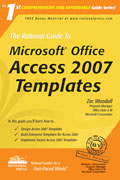
 The Rational Guide To Microsoft Office Access 2007 Templates ($24.99 value)
by Zac Woodall
|
Thank you for your interest. This offer is no longer available. Visit Amazon.com to get your own copy! |
Our friend Zac Woodall is a Program Manager and lead developer on the Microsoft Access 2007 development team. He wrote this book on using the new template feature of Microsoft Access 2007. Learn directly from one of the premier Access 2007 experts!
Through special arrangements with Zac and Rational Press, we're pleased to offer a limited quantity of his book for free to purchasers of our Microsoft Access products! Simply purchase one of these products:
- Total Access Admin 2007
- Total Access Emailer 2007
- Total Access Startup 2007
- Total Access Statistics 2007
Terms and Conditions
- Not available for past orders or reseller sales.
- Limited to one book per customer.
- Customer are responsible for shipping:
- For US customers, this can be included in your shipment for no additional cost
- Cost for international customers based on actual shipping cost.
- Offer available while supplies last.
Book Description
Microsoft Access 2007 uses templates to create tracking applications, offering a rich user experience for entering, managing, and reporting on data for targeted scenarios. In The Rational Guide to Microsoft Office Access 2007 Templates, Microsoft Program Manager Zac Woodall shows how to design, create, and share Access templates.
Topics include customization, personalization, branding, and working with SharePoint. Advanced topics include template file anatomy, template collections, enterprise templates, generating templates without running Access, and integrating templates with add-ins.
Includes FREE Bonus Materials (After Book Registration)
- Sample code from the book
- Sample templates from the book
- Bonus chapter on how to install and use .accfl field template XML files to customize the Access Field Templates task pane