Quickly Filtering Data in Any Microsoft Access Datasheet View
Provided by the FMS Development Team
Whenever viewing data in any Microsoft Access 2003 or earlier datasheet (i.e. Table, Query, Datasheet Form or Subform), you can quickly filter the data that is displayed by applying a quick filter. You can apply more than one filter, and you can continue adding filters until you reach one or no more records.
One way to do this is to Right-click in any column (not on the column header) to perform a quick filter. When you right-click, a menu is displayed with the following options:
- Filter By Selection
- Filter Excluding Selection
- Filter For [textbox to enter criteria]
The first two are very useful and self-explanatory, but the third is somewhat scary, as it allows input from the user. It has a textbox in the menu that accepts entry of any valid
criteria, just as you would if you were creating a query. For starters, try entering an exact value from your data. (e.g. ALFKI, 12209, or Germany). To take this a step further, you
can also use the 'OR' operator. (Germany OR Mexico). Finally, to really give you flexibility, you can use the pattern matching(*[mdb] or %[ADP]) operators and/or the comparison
(<,>,<>, Between...And) operators.
| Search Entry | Returns |
|---|---|
| Germ* or Mex* | Germany or Mexico |
| (202)* | All phone numbers that start with area code (202) |
| >17 | All people over the age of 17 |
| Between Date()-30 and Date() | Everything that occurred in the last 30 days |
So, although the filtering capability was designed to be a quick and dirty way to drill into your data, it still offers a very robust ability to get there. But, if you find that you are repeating the same filter on a regular basis, then you should probably save it as a query.
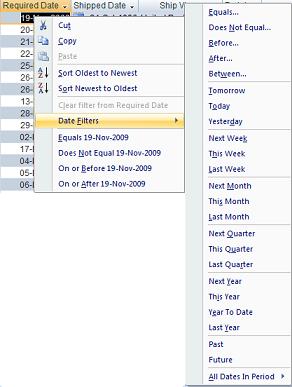 Microsoft Access 2007 adds a significantly improved set of search options on the right click menu. It can filter on specific values, partial matches, and
ranges without having to specify the syntax like *. It also understands date fields and offers common searches like today, this week, this month, last month,
etc. For more information on what we like about Access 2007, visit:
Microsoft Access 2007 adds a significantly improved set of search options on the right click menu. It can filter on specific values, partial matches, and
ranges without having to specify the syntax like *. It also understands date fields and offers common searches like today, this week, this month, last month,
etc. For more information on what we like about Access 2007, visit:
Top Features of Microsoft Access 2007 That Aren't Available in Prior Versions
The section on Improved Filtering Options is directly related to this topic.
 Latest Newsletter
 Demos
Demos
 Microsoft Access Developer Help Center
 Microsoft Access Query Help Center
 MS Access to SQL Server Upsizing
 Microsoft Outlook Tips
 Technical Papers
 Tips and Techniques
 Videos
Connect with Us
 Email Newsletter
 Developer Team Blog
 Facebook
 X/Twitter
 Support Forum & Tickets
Additional Resources
 Book
Book Links to Related Sites
 My FMS
Thank you! Thank you! I just finished reading this document, which was part of a link in the recent Buzz newsletter. I have printed it for others to read, especially those skeptical on the powers of Access and its capabilities.
Darren D.
 All Our Microsoft Access Products



