


Compare and Find Differences Between Microsoft Access Macros (including Embedded Macros)
Total Access Detective performs detailed comparisons between two macros to reveal exactly what's different. Compare two macros in one database or identically named macros in two databases (MDB, ADP, or ACCDB formats).
Total Access Detective makes it easy to find changes to your macros:
- Macro property differences (description, last updated, etc.)
- Macros line difference for the main macro
- Sub Macro names that exist in one macro and not in the other
- Macros line differences for identically named sub macros
Embedded macros on forms and reports are compared when the form/report is compared. Embedded macros for the same event on identically named controls are compared.
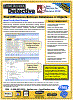
MS Access Macro Comparison Results
Blocks of macro line differences are shown. For two database comparisons, all the identically named macros are compared and their differences shown:

Example of Different Macro Line Commands
Embedded Macro Differences
Embedded Macros on form and report events are compared line-by-line for differences:

Example of Embedded Macro Differences between Forms
Reports are available for:
- Macro Line Differences
- Printouts of All Lines for Each Macro
- Macro Property Differences

Microsoft Access 365/2024 Version is shipping!

New X.6 Versions for Access 2016, 2013 and 2010
New Version 12.9 for
Access 2007
Version 11.8 for
Access 2003

Reviews
"Total Access Detective is well worth every penny, it will quickly pay for itself through savings in time and effort."
Tom Cryan, Denver Access User Group product review

Best Debugging Tool
Detective Info

Why Detective?
Additional Info




