


|

|
 Total Access Memo for Microsoft Access 97
Add Formatted Memo Fields to Microsoft Access Forms and Reports!
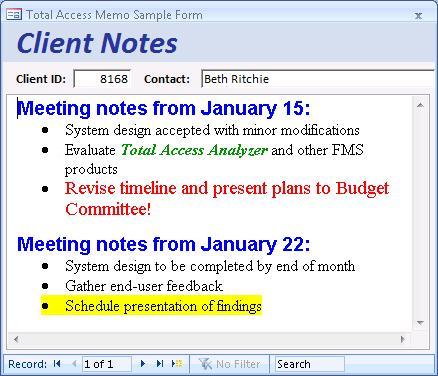
Total Access Memo gives Microsoft Access users and developers the ability to add formatted memo fields to their forms and reports. Enhance your applications by adding support for features such as fonts, point sizes, boldface, italics, underline, bullet points, paragraph alignment, and tab stops.
Easy to Use
Add the Total Access Memo control to your form or report and bind it to a memo field. Press [Shift]+[F2] on the field to launch our editor, and when you finish, it is automatically saved in your table and displayed on your form. You can save and maintain both an RTF and a non-formatted (text only) memo field.
You can even import text files in RTF format, export the current field to an RTF file, or export to a text only file.
Integrated Editor
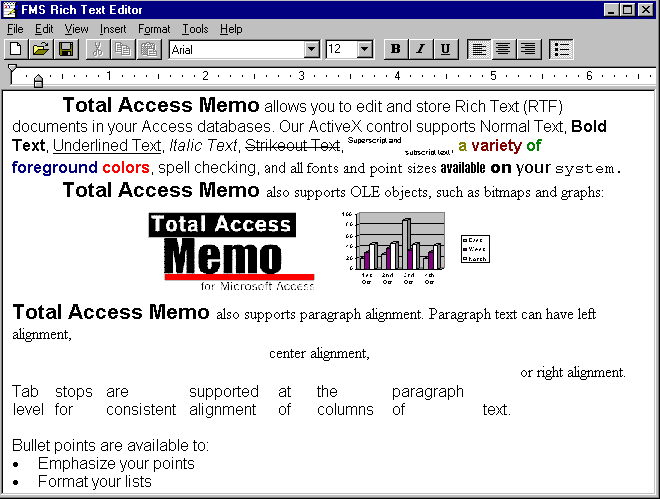
Our RTF editor lets you easily enter text and apply the styles you want. Highlight your text and apply the formatting options. The editor also includes features such as Find, Search & Replace, and Spell Checking.
New Features in Version 8.0
Total Access Memo 8.0 for Microsoft Access 95/97 includes many significant enhancements over version 2.0. The control has been expanded to support the following additional features:
- Direct data binding of the control to memo fields eliminates the need to write code.
- Several new character formatting options: superscript, subscript, and strikeout text.
- OLE objects (such as graphics or spreadsheets) can be inserted in the memo.
- Drag and drop text editing.
- In-place editing on the form without launching the editor.
- Paragraph-level tabs (previously, tabs were set for the entire field across all paragraphs.)
- Enhanced programmatic control with many new properties, events, and methods.
In addition, the editor includes the following enhancements:
- Uses the Microsoft Access (Office) spell checker, thereby, supporting your language and custom words. (Version 2 only had spell checking for American English.)
- Localized menus and dialogs for English, German and Spanish.
- May be used as a regular standalone program, much the same as Microsoft WordPad.
Licensing Information
Total Access Memo is available in a single license or 5 license version. Contact FMS, Inc. to purchase additional licenses. Licenses are granted on a PER DEVELOPER basis. For each license, one designated developer can use the program on one computer at a time.
For complete details on, visit the Total Access Memo License Agreement page.
Pricing and Availability
Total Access Memo is available for Microsoft Access versions 2.0, 95, 97, 2000, 2002, 2003 and 2007, and the 32-bit versions of Access 2010, 2013 and 2016. This product is available as a single product, a five-user package, or as a part of the Total Access Ultimate Suite.
Total Access Memo is licensed on a per developer basis and includes a royalty-free runtime license for that developer to incorporate Total Access Memo into applications distributed to non-Total Access Memo owners. Total Access Memo also supports Access applications deployed with the runtime version of Microsoft Access.
|
Total Access Memo Pricing for Microsoft Access |
|||
| Microsoft Access Version | |||
Licenses |
Price |
64 and 32-bit Access: 365/2024, 2021, 2019, 2016, 2013 and 2010 |
32-bit Only Access: 2007, 2003, 2002, 2000 |
| Single | $399 | Buy Now | Buy Now |
| 5-Seat | $1199 | Buy Now | Buy Now |
|
Upgrades |
|||
| Single | $299 | Buy Now | Buy Now |
| 5-Seat | $899 | Buy Now | Buy Now |
|
Premium Support Subscription |
|||
| Single | $299 | ||
| 5 Seat | $999 | ||
|
Also Available as part of: |
|||
|
Total Access Ultimate Suite |
|||
|
Runtime/Redistributable Version |
|||
| Royalty-free redistribution rights are included in the purchase price. | |||
|
Licensing Information |
|||
|
Total Access Memo is licensed on a per developer basis. Each developer who uses the program must have a license. |
|||
2025 Version is Shipping!

Supports 64 and 32-bit versions of Microsoft Access 2010, 2013, 2016, 2019, 2021, 2024/365,
and 32-bit versions of Access 2007, 2003, 2002, and 2000!

Reviews

Best ActiveX Control
"Total Access Memo makes all the difference in my Access apps! Only Memo gives me fonts, colors, images and all the formatting tools I need. It's great!"
B. Simmons, Ciena, Linthicum, MD
Memo Info

Additional Info




