



 New Features in Total Visual CodeTools 2007
This is no longer the latest version of Total Visual CodeTools.
Existing Total Visual CodeTools customers can upgrade to the latest version for a nominal fee.
For more information on the new features, visit Total Visual CodeTools 2010.
The world's most popular collection of tools and utilities for Microsoft Access/Office VBA and VB 6 is now available for Microsoft Office Access 2007. Total Visual CodeTools 2007 introduces several exciting enhancements to make creating and maintaining code easier than ever.
Enhancements
We've made many enhancements since the previous version of Total Visual CodeTools 2003:
- Supports Microsoft Access/Office 2007
- Unused Variable Analysis
- Code Builder Enhancements
- Coding Tool Enhancements
- Code Cleanup and Delivery Enhancements
- Improved Standards Section
- A New Microsoft Office Access 2007 User Interface
- New User Manual
- Pricing and Access Versions
Total Visual CodeTools is fully supported under Access/Office 2007, and supports the new VBA syntax.
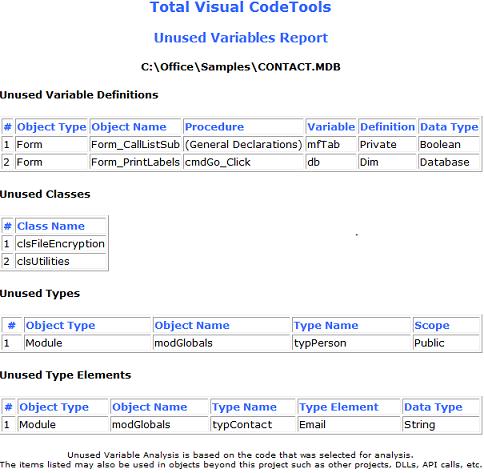
The new Unused Variable Analysis feature helps you detect and eliminate unnecessary code from your project. Not only does it make your code more compact, the analysis may highlight problems where you thought the code should be doing or tracking something that it is not.
Easily find unused variables, constants, procedure parameters, classes, and user defined types and type elements.
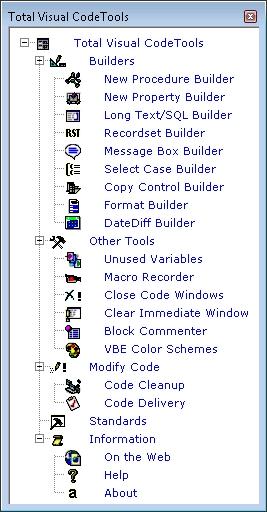
Total Visual CodeTools 2007 includes various improvements that make the Code Builders more effective and easier to use, including:
- The New Procedure Builder has direct control of including comments and error handling, adds an error handler specific to forms/reports, creates the return value assignment for functions, and can automatically use the current procedure name.
- The Recordset Builder is completely redesigned to support Access 2007 ACCDBs, Access database and project objects, and selecting the current and shared databases. Easily create ADO or DAO code to browse, add or edit records in your selected data source (table or query) and fields.
- The New Property Builder offers options to include or exclude comments and error handling.
- The Long Text/SQL Builder includes options for word wrapping SQL text on AND/OR and JOIN syntax to make it easier to read your SQL strings.
- The Message Box Builder has an easier selection of icons, and a reorganized set of options for the return variable.
- The Select Case Builder lets you assign a variable for each case value, and automatically assign it a value with automatic incremental assignment for numbers.
- The Copy Control Code Builder includes a Generated Text section so you can preview the new code before adding it.
- The Format Builder is organized into tabs and allows you to add and save your own formats.
- Builders automatically generate new code as you change options.
Total Visual CodeTools' Coding Tools have been improved with the following enhancements:
- The Macro Recorder captures control key combinations, including clipboard operations. You can also record keystrokes in one module and play them in another.
- Close Code Windows includes an option to close only code or object windows in Visual Basic.
- The Block Commenter includes options to put the block of code in IF FALSE blocks, and allows you to add your comment text and remove indentations.
Total Visual CodeTools Code Cleanup and Delivery features are enhanced with the following new features:
- Support for the new Access/Office 2007 Syntax
- Improved viewing and searching of preview
- Messages, including alerts, are stored in an HTML report
- Option to permanently hide the initial warning screen (stored under Standards)
- Improved performance
Total Visual CodeTools has a revised Standards section with:
- More control offered to individual builders
- New error handing templates for forms/reports
- Ability to add new data types for naming conventions
- Consolidated Recordset Builder variables under naming conventions
Total Visual CodeTools 2007 has a more modern user interface including support for Windows XP Themes, Windows Vista, and manifest files in VB 6.0.
A new professionally printed 166 page user manual and online context sensitive help.
Pricing and Access Versions
|
Total Visual CodeTools Pricing for Visual Basic (VB6) and VBA such as Microsoft Office/Access/Excel/Word |
|||
| Licenses | Price | 2016, 2013, 2010, 2007, 2003, 2002, 2000, VB6 |
97 |
| Single | $299 | Buy Now | Buy Now |
| 5-Pack | $899 | Buy Now | Buy Now |
|
Upgrades |
|||
| Single | $199 | Buy Now | Buy Now |
| 5-Pack | $899 | Buy Now | Buy Now |
|
Premium Support Subscription |
|||
| Single | $299 | More Information | |
| 5-Pack | $999 | ||
|
Also Available as part of: |
|||
|
Runtime/Redistributable Version |
|||
| Not Applicable | |||
|
Licensing Information |
|||
| Total Visual CodeTools is licensed on a per developer basis. Each developer who uses the program must have a license. |
|||
Microsoft Office Access 2016, 2013, 2010 Version
is Shipping

Supports Office/Access 2016, 2013, 2010, 2007, 2003, 2002, 2000, and Visual Basic 6.0!
Also available for
Access 97

Rave Reviews
"Total Visual CodeTools is by far my favorite third-party product."
Alison Balter, Author, Conference Speaker, Instructor

Best Visual Basic Add-In
Rave Reviews
CodeTools Info


Why CodeTools?
Additional Info