Microsoft Access Object Dependencies
Provided by the FMS Development Team
Microsoft Access has a feature to help you determine which objects require another object, or whether the object is needed for another object. This is what is known as a dependency. For example a report is dependent on a query for it's data, or a Main form may have a subform dependent.
To see an example of this new feature try the following:
- Open the Northwind Database
- Click on the Forms tab
- Click one time on the "Customer Orders" form to highlight it
- From the Main Menu, choose View, Object Dependencies...
This action will open a task pane titled 'Object dependencies', and gives you two options:
- Objects that depend on me
- Objects that I depend on
A Treeview of different categories for the object allows you to navigate easily to see the dependencies. The categories are Tables, Queries, Forms, and Reports. This can visually give you a better idea of how any object is used throughout a database. There is nothing worse than deleting an needed object that you thought was no longer used.
Microsoft Access generates the dependency information by searching the name maps. These maps are maintained by the Name AutoCorrect feature. If tracking name AutoCorrect information is turned off, you cannot view dependency information. This setting is found on the General Tab of the Tools/Options menu choice.
Even if AutoCorrect is on, the object dependencies are not complete. If objects are referenced in VBA code, none of those dependencies are detected. Without knowing these references, you'll still need to be very careful when renaming or deleting objects
 For comprehensive
cross-reference documentation of your Access
databases, check out our Total Access Analyzer
program. This award winning product is the most
popular Access add-in and provides detailed
cross-references (including VBA code) for all
your Access objects and code. From tables,
queries, forms, reports, macros, procedures,
variables, constants, classes, and much more.
For comprehensive
cross-reference documentation of your Access
databases, check out our Total Access Analyzer
program. This award winning product is the most
popular Access add-in and provides detailed
cross-references (including VBA code) for all
your Access objects and code. From tables,
queries, forms, reports, macros, procedures,
variables, constants, classes, and much more.
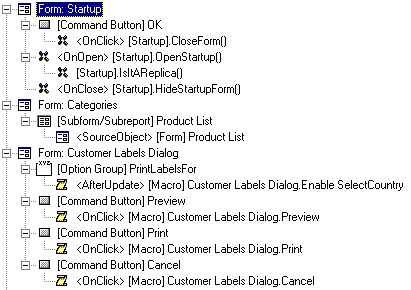
It also includes three hierarchical diagrams to show Application Flow, Data Flow, and Objects. Here's more information on the product:
- Finding and Deleting Unused Access Objects and Code
- Hierarchical Flow Diagrams to show multi-level relationships:
- Application Flow across code, events, and objects (right)
- Data Flow from tables to queries to forms/reports, etc.
- Object Diagram to see all the objects within a form or report
- Best Practices for Microsoft Access Database Development
 Latest Newsletter
 Demos
Demos
 Microsoft Access Developer Help Center
 Microsoft Access Query Help Center
 MS Access to SQL Server Upsizing
 Microsoft Outlook Tips
 Technical Papers
 Tips and Techniques
 Videos
Connect with Us
 Email Newsletter
 Developer Team Blog
 Facebook
 X/Twitter
 Support Forum & Tickets
Additional Resources
 Book
Book Links to Related Sites
 My FMS
Thank you! Thank you! I just finished reading this document, which was part of a link in the recent Buzz newsletter. I have printed it for others to read, especially those skeptical on the powers of Access and its capabilities.
Darren D.
 All Our Microsoft Access Products



