 Microsoft
Visual Studio LightSwitch for Microsoft Access, SQL Server, and Visual Studio .NET Database Developers
Microsoft
Visual Studio LightSwitch for Microsoft Access, SQL Server, and Visual Studio .NET Database Developers
The Visual Studio team has introduced a development platform called LightSwitch which simplifies the creation of database applications in Visual Studio. This rapid application development environment lets you create solutions that can be easily deployed on Windows or Mac platforms from a public web site or Intranet.
This article provides an overview of the benefits and limitations of the LightSwitch platform for the Microsoft Access community.
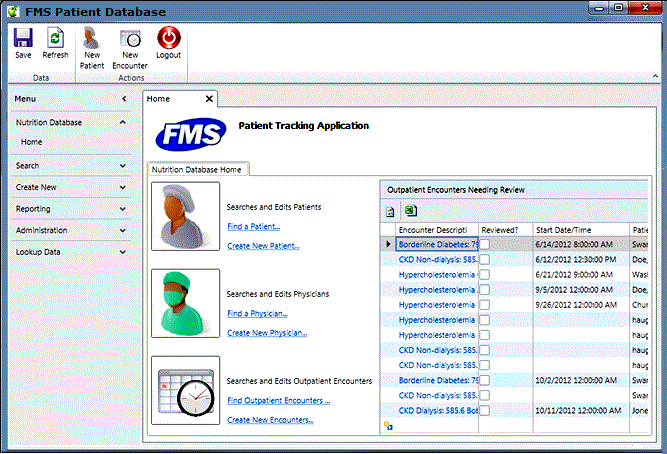
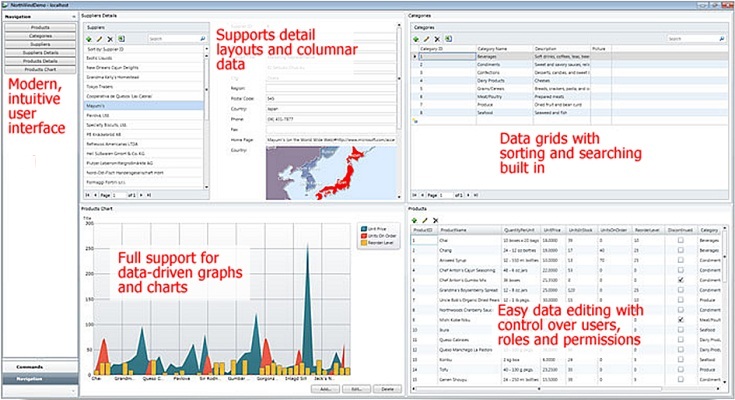
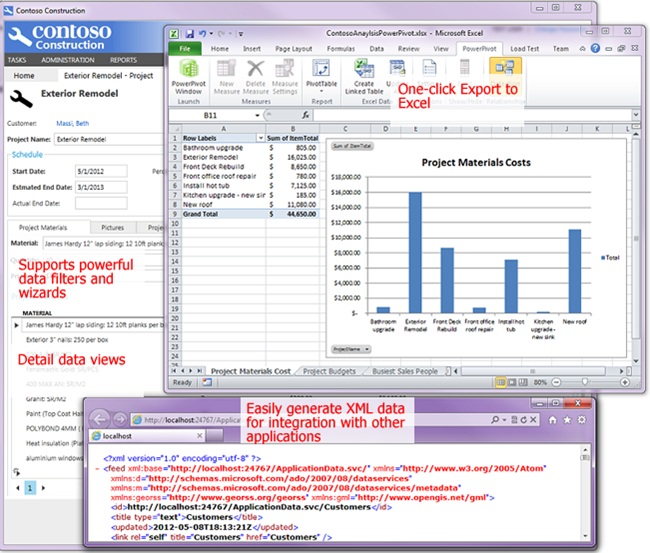
Here are some examples of what can be created in LightSwitch.
Sample LightSwitch User Interface
Dashboards Built in LightSwitch
LightSwitch Integration with Other Programs

While LightSwitch can be used to create database applications with limited coding, as part of the Microsoft Visual Studio .NET family, LightSwitch supports customization using C# and VB.NET programming languages. This offers all the benefits of managed code and the latest programming features.
LightSwitch does not support Office/Access VBA.

LightSwitch works directly against SQL Server databases. It understands table structures, referential integrity, one-to-many relationships, and other database architecture so that it can bind directly to your table, fields, and records. It requires your database to be properly designed with primary keys and other basic requirements, so having a good database design helps (and should be done anyway).
It also supports databases hosted on SQL Azure, Microsoft's cloud provider.

LightSwitch provides the ability to deliver incredibly rich, intuitive and easy to use applications, all within a Windows, Mac or Browser client. It offers affordable, reliable, and scalable custom solutions with user-friendly views of your data. It dramatically decreases the time it takes to build and deliver the custom application compared to traditional Visual Studio .NET approaches.
LightSwitch allows the use of extensible application shells to provide users with the familiar feel of popular Microsoft software, significantly reducing learning curve and application adoption time.
Built-in authentication models simplify the management of users with varying degrees of access and authorization, especially when integrated with existing Active Directory implementations.

Visual Studio .NET and LightSwitch are used by the developer and are not installed on the users' machines.
However, LightSwitch applications require installing the free Microsoft’s Silverlight on each user's machine. This is a one time installation similar to installing Adobe Flash to watch videos or Adobe Acrobat Reader to open PDF files. Silverlight allows applications to be easily run on desktops and browsers through a one-click deployment, thereby dramatically reducing distribution and maintenance efforts. The Silverlight requirement makes a LightSwitch application inappropriate for general Internet solutions.
Unlike Microsoft Access database applications, you don't need to worry about what the user has installed on their Windows desktop, the version of Office/Access, and version conflicts on their machine. Unlike installing Office which usually requires physically updating each machine, Silverlight can be installed by the user from their browser.
LightSwitch runs as a Windows or Mac client application, and supports multiple web browsers, including:
- Internet Explorer versions 7 or later, on Windows Vista, Windows 7, or Windows 8
- Google Chrome version 12 or greater
- Mozilla Firefox version 3.6 or higher
- Apple Safari on Macintosh OS 10.5.7 (Intel-based) or higher
These browsers can run on 32 or 64-bit operating systems.
Does not Support iPad, iPhone, Android and Windows Phones
Silverlight is not supported on mobile platforms such as the iPad/iPhone, Android or Windows phone.
Silverlight Requirement Limits its Use for Public Websites
By requiring the installation of Silverlight, LightSwitch applications are not suited for public web sites where visitors may not have it installed on their machines (sites face the similar issue when using Flash). However, for internal users and close external contacts, this requirement may be perfectly acceptable.
Does not Support 64-bit Browsers
Silverlight is currently a 32-bit program that does not run in 64-bit browsers. This should not be an issue for most users. By default, on 64-bit PCs, the 32-bit version of Internet Explorer is installed and extra steps are required to intentionally install the 64-bit version, which will have problems supporting other common 32-bit components as well.
Limited User Interface Options
The LightSwitch architecture limits the user interface to its structure. We find the structure suitable for most database solutions but many Visual Studio .NET developers find the constraints (or potential constraints) too restrictive and uncomfortable in the long-term. There is definitely a tradeoff here, so it's important everyone understands the style of solution LightSwitch offers and are comfortable with it.
No Reports
LightSwitch doesn't offer reporting. You can display data in a list, but you can't get the nice reports with groupings, summaries, sub-reports, etc. that exist in Microsoft Access. With SQL Server, you can use its Reporting Services feature, but integrating it into a .NET application is not the same as Microsoft Access where you can share the same variable space as the application. There are third party controls that can be added for reporting.
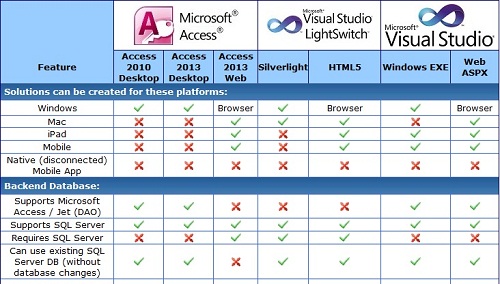
Since this paper was written, Microsoft has released an update of LightSwitch with Visual Studio 2012 that supports the creation of HTML5 based solutions. This replaces Silverlight and offers true browser-based LightSwitch application that can run on Windows, Mac, iPad, and mobile devices with browsers that support HTML5.
However, the features are not identical to the Silverlight platform which provides a richer end user environment that can be locally installed and run. For more details, visit our: Microsoft Access and Visual Studio LightSwitch Comparison Matrix
Additional Resources from Microsoft
Here are some resources and sites that are helpful:
With our experience building Microsoft Access and SQL Server solutions, we are very excited by the functionality and productivity LightSwitch offers for database application developers. LightSwitch fills a niche that allows the creation of web deployable SQL Server database solutions with .NET extensibility. It's ideal for solutions where the users are known either inside your organization or over the web. Microsoft Access remains a viable solution for end users, information workers, and applications that work on Windows.
Database Evolution
Visual Studio LightSwitch offers the Microsoft Access community the opportunity to extend their platform beyond the Windows desktop. It is the natural evolution of solutions which start in Excel, evolve to Microsoft Access, grow into SQL Server, and now to the Intranet and web. Compared to traditional Visual Studio .NET applications, the learning curve for LightSwitch is considerably shorter which means solutions that were either too expensive or took too long to build, can now be created profitably.
For more information on choosing the right platform for your application, visit our page: Comparison of Microsoft Access, LightSwitch and Visual Studio Platforms for Database Developers
If you're interested in learning how our Professional Solutions Group can help you with Microsoft Access, LightSwitch, SQL Server, and/or Visual Studio .NET, please visit our LightSwitch Consulting page.
LightSwitch 2013
Microsoft just announced the release candidate of LightSwitch in Visual Studio 2013. We know some of the limitations we cite are addressed in the new version, so that's promising. We'll update this paper when we gain more real world experience with it. Meanwhile, please let us know what you think.
Strategic Overview
Microsoft Access within an Organization's Database Strategy
How many simultaneous Microsoft Access users?
Blaming Microsoft Access instead of the Developer
History of Access
Microsoft Access Version Feature Differences
Microsoft Access Versions, Service Packs and Updates
Microsoft Office 365 Access Update Version Releases
Best Practices
Taking Over Legacy MS Access Databases

Winner of Every Best Access Add-in Award
Table Design
Set AutoNumber Starting Number Other than 1
Avoid Unnecessary or Duplicate Indexes
Query Design

Form Design
Copy Command Button and Keep Picture
Module VBA to Forms and Controls
Subform Reference to Control Rather than Field
Report Design
Suppress Page Headers and Footers on the First Page of Your Report
Annual Monthly Crosstab Columns
Design Environment
Add Buttons to the Quick Access Toolbar
Collapse the Office Ribbon for more space
VBA Programming
Avoid Exits in the Body of a Procedure
Send Emails with DoCmd.SendObject
Source Code Library

VBA Error Handling
Error Handling and Debugging Techniques
Error Number and Description Reference
Performance Tips
Deployment
Remote Desktop Connection Setup
Terminal Services and RemoteApp Deployment
Missing Package & Deployment Wizard

System Admin
Database Corruption
Remove 'Save to SharePoint Site' Prompt from an Access Database
Class Not Registered Run-time Error -2147221164
SQL Server Upsizing

Microsoft Access to SQL Server Upsizing Center
When and How to Upsize Access to SQL Server
SQL Server Express Versions and Downloads
Cloud and Azure
Deploying MS Access Linked to SQL Azure
SQL Server Azure Usage and DTU Limits
Visual Studio LightSwitch
Additional Resources
Connect with Us
 Email Newsletter
 Developer Team Blog
 Facebook
 X/Twitter
 Support Forum & Tickets


