



 Automatically
Compact and Repair Microsoft Access Databases with Compact On Close
Automatically
Compact and Repair Microsoft Access Databases with Compact On Close
Provided by: Molly Pell, Senior Systems Analyst
Microsoft Access/Jet databases require routine maintenance to ensure reliability, integrity, and efficiency. Compacting and repairing an Access/Jet database does the following:
- Consolidates and organizes data pages, recovering space used by deleted or renamed objects.
- Updates table and index statistics, so the query optimizer can choose the most efficient query plan.
- Physically re-orders the rows in the table in the order of the chosen clustered index on the table.
- Resets the next available number for AutoNumber (or "counter") fields, so the next available number is one higher than the current highest value in the table.
- Repairs the database if structural inconsistencies are found.
If you are diligent enough to remember this maintenance task, you can manually compact and repair a database by opening it in Microsoft Access, and selecting Compact and Repair command from the menu (see Microsoft Access Compact and Repair by Access Version). However, you can save yourself some time and effort by configuring your database to compact and repair itself every time you close the database.
Open the database you want to compact on close.
 Microsoft Access 2007, 2010, 2013, 2016, 2019, 2021, and 365
- Open the Access Options form
- For Access 2010 and later, from the File menu, select Options
- For Access 2007, from the Office button, select Access Options
- Select the Current Database item on the left border
- Check the "Compact on Close" box:
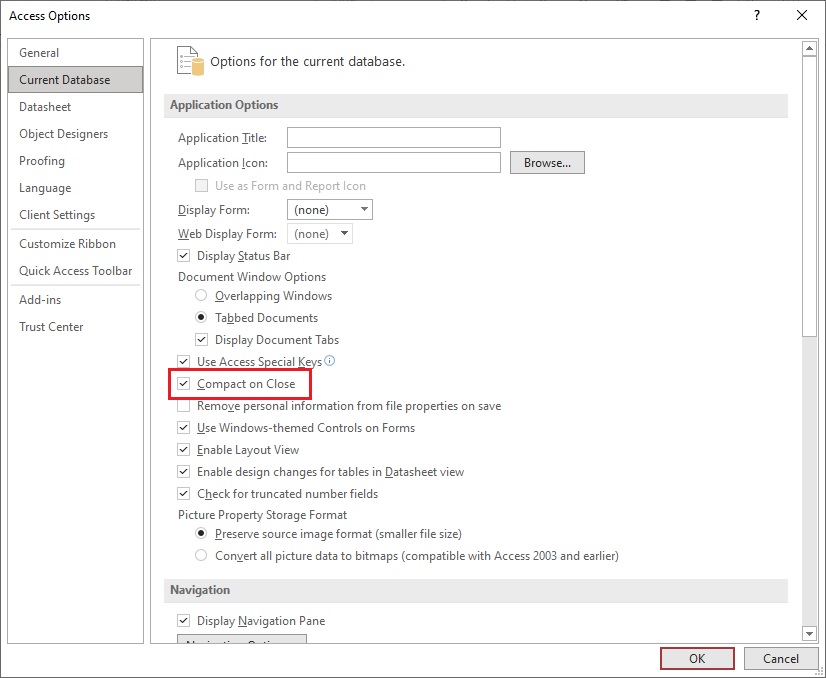
Access Options in Microsoft Access 365 to 2010
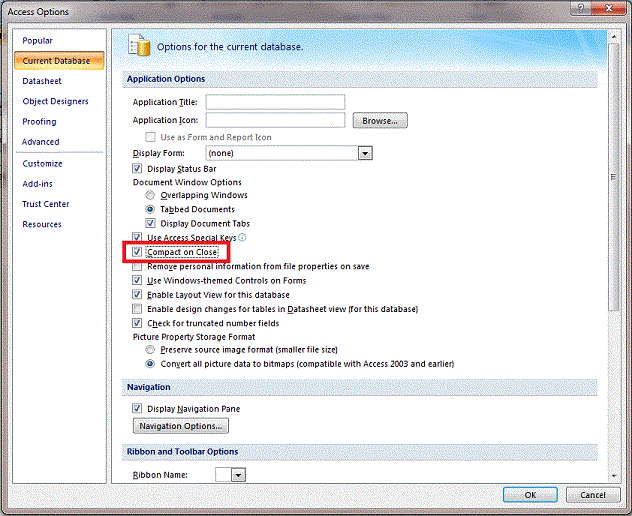
Access Options in Microsoft Access 2007
Access 2003 or Earlier
- Select the Tools | Options menu option to open the Access Options form
- On the General tab, check the "Compact on Close" box:
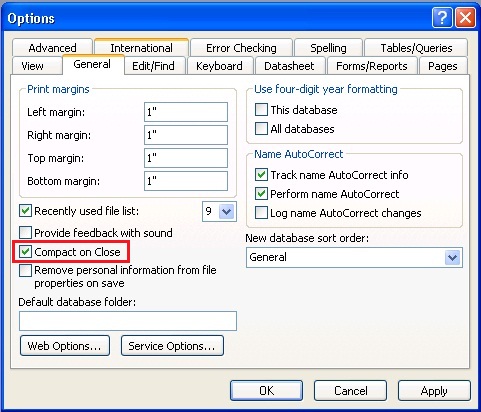
Turning on "Compact on Close" certainly helps ensure that these important maintenance tasks are performed regularly, but there are limitations:
- The Compact on Close option can significantly increase the time that it takes to close the database, and can use considerable system resources which could delay the user from getting other work done.
- Databases are only compacted and repaired when you open and close them interactively. Backend/linked databases that are not opened interactively must be compacted and repaired in another way.
- Compacting and repairing requires exclusive access to the database. For multi-user databases, you must ensure that no users have the database open prior to compacting and repairing.
 Have any suggestions or comments? Head to our blog post
Automatically Compact and Repair Microsoft Access Databases with Compact On Close and leave us your feedback!
Have any suggestions or comments? Head to our blog post
Automatically Compact and Repair Microsoft Access Databases with Compact On Close and leave us your feedback!
- Creating a Backup and Disaster Recovery Plan for Microsoft Access Database Applications
- Compact on Close command
- How the decompile command eliminates VBA related errors
Decompile Your Microsoft Access Database to Improve Performance, Fix Corruption, and Avoid Strange Errors - Microsoft Access Inconsistent Compile Error for a Field Reference in a Form
- All Microsoft Access Error Numbers and Descriptions
- Microsoft Access Developer Corner

Total Visual Agent manages an unlimited number of databases across your network and schedule database chores in the middle of the night. Perform compact, backups, data extracts, running macros, command lines, and other tasks. Schedule events hourly, daily, weekly, monthly or just one time. Complete audit trail with email notification if anything goes wrong. Try the Free Trial today!

Total Access Admin lets you monitor Access databases in real-time to see who's currently in it and when they leave. It flags users who disconnect in a suspect manner which may indicate a source of database corruption. It can also perform tasks after everyone has exited such as compact. Try the Free Trial today!
Version 2021 is shipping!

With Windows Service!
Supports: All Access, Jet Engine, and Visual Basic versions

Reviews
"Total Visual Agent is a real find, a rare combination of ease of use, and bang for the buck. In the end, no other competitor even comes close."
Thomas Wagner, Product Review in MS Office and VBA Developer


Agent Info

Related Resources
Additional Info




