



 Microsoft
Access Database Compact and Repair to Minimize Corruption and Avoid Bloat (by Access Version)
Microsoft
Access Database Compact and Repair to Minimize Corruption and Avoid Bloat (by Access Version)
Microsoft Access/Jet Databases Need to be Periodically Compacted
File server databases like Access/JET MDB and ACCDB files need to be periodically compacted and repaired for optimal performance and to minimize database corruption. Compacting also eliminates database bloat that can occur as data is added and deleted in the database. Here's a Microsoft Knowledgebase article that discusses some of the issues.
Microsoft Access databases can be manually compacted from the Access menu. Over the last few versions of Access, the location of this command has moved around. Here's a summary across versions of compacting the currently opened database or another database.
Compact and Repair Database by Access Version
 If you have a database open, the Compact and Repair Database command will compact it. If a database is not open, it will prompt you to select a database on disk and the name of the
compacted database. You can select the option from the Database Tools ribbon:
If you have a database open, the Compact and Repair Database command will compact it. If a database is not open, it will prompt you to select a database on disk and the name of the
compacted database. You can select the option from the Database Tools ribbon:

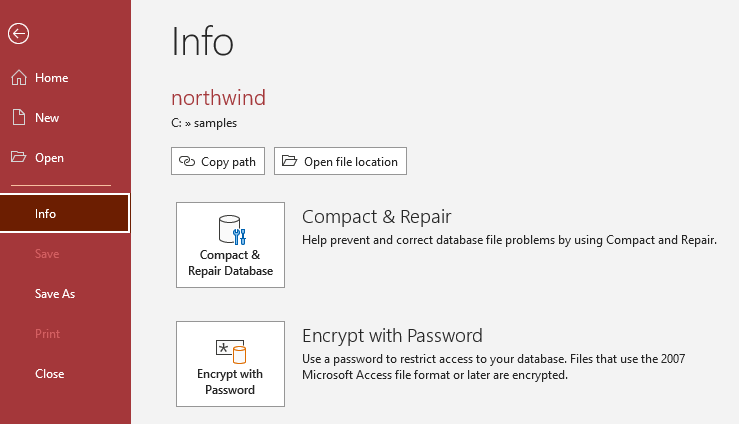
It is also available on the File Menu. Choose Info, then select the Compact & Repair Database button on the right:
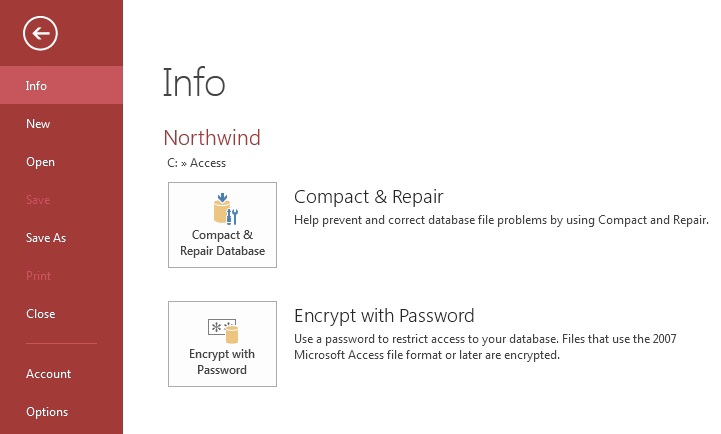
 The feature is similar in Access 2016 and 2013 with different icons:

It is also available on the File Menu. Choose Info, then select the Compact & Repair Database button on the right:
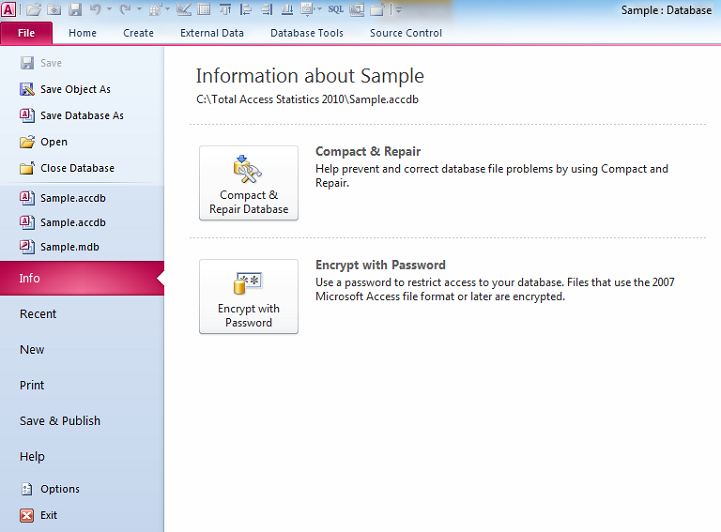
 Similarly, the Compact and Repair Database option is on the Database Tools ribbon:

It is also available on the File Menu, under Info. Select the Compact & Repair Database button on the right:
 Microsoft
Access 2007 does not have a Compact option from the Database Tools ribbon. To compact in Access 2007, from the Office button, select Manage and choose
Compact and Repair Database:
Microsoft
Access 2007 does not have a Compact option from the Database Tools ribbon. To compact in Access 2007, from the Office button, select Manage and choose
Compact and Repair Database:
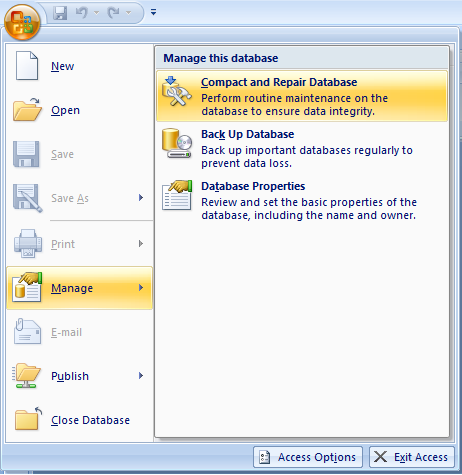
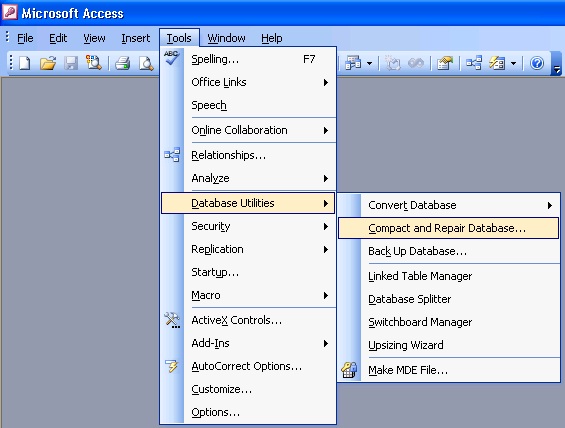
 Pre-ribbon, it was simply on the menu under: Tools, Database Utilities, Compact and Repair Database
 Blog on this topic:
Microsoft Access Database Compact and Repair to Minimize
Corruption and Avoid Bloat
Blog on this topic:
Microsoft Access Database Compact and Repair to Minimize
Corruption and Avoid Bloat
- Creating a Backup and Disaster Recovery Plan for Microsoft Access Database Applications
- Compact on Close command
- How the decompile command eliminates VBA related errors
Decompile Your Microsoft Access Database to Improve Performance, Fix Corruption, and Avoid Strange Errors - Microsoft Access Inconsistent Compile Error for a Field Reference in a Form
- All Microsoft Access Error Numbers and Descriptions
- Microsoft Access Developer Corner
Total Visual Agent manages an unlimited number of databases across your network and schedule database chores in the middle of the night. Perform compact, backups, data extracts, running macros, command lines, and other tasks. Schedule events hourly, daily, weekly, monthly or just one time. Complete audit trail with email notification if anything goes wrong. Try the Free Trial today!

Total Access Admin lets you monitor Access databases in real-time to see who's currently in it and when they leave. It flags users who disconnect in a suspect manner which may indicate a source of database corruption. It can also perform tasks after everyone has exited such as compact. Try the Free Trial today!
Version 2021 is shipping!

With Windows Service!
Supports: All Access, Jet Engine, and Visual Basic versions

Reviews
"Total Visual Agent is a real find, a rare combination of ease of use, and bang for the buck. In the end, no other competitor even comes close."
Thomas Wagner, Product Review in MS Office and VBA Developer


Agent Info

Related Resources
Additional Info




