


Total Access Detective
 by Mike Gunderloy
Smart Access September 1996
Reprinted with permission from Smart Access, All rights reserved.
Total Access Detective is the latest addition to the Total Access line of Access 2.0 database utilities from FMS. This Utility lets you track changes to access objects, either within the same database or across databases. While not a full scale source control utility, this add-in will save you many hours of difficulty when managing any Access application with multiple developers.
You'd never need this utility if your development work always proceeded without a hitch. In a perfect world, you'd design your application, create the objects it requires, test everything, ship it to the client, and relax until your next job came along. Unfortunately, application development seldom works this way. Clients change their minds, Access crashes, backup versions have to be restored, changes are requested 10 months later, and things in general go wrong. The situation becomes even more confusing when more than one developer is involved. Start a project and within a few days there'll be a dozen different versions of your database.
Sooner or later you'll be faced with a problem: which version of the customer form is most current? Or which developer last changed the orders table? These are precisely the sort of questions that TA Detective is designed to answer. Comparing two databases is what this utility is all about.
Getting Started
You start by choosing the two databases to compare. If you want to include code in your comparison, you'll first have to "prepare" the two databases. This step exports all of the module text to another file for each database. This will increase the disk space required for your databases by about a third, but it also allows you to check for changes in module code as well as other objects. After you choose the databases, TA Detective will inventory each one and try to determine which objects might have changed. Figure 1 shows the on-screen report that the program generates at this point:
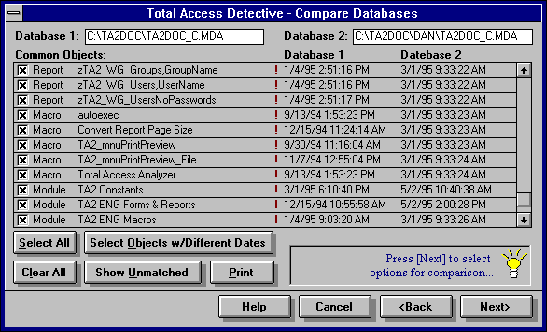
Figure 1: Object comparison report for two versions of a database.
The exclamation points mark objects in the two databases that were last updated on different dates. Question marks indicate all other tables; since changing data doesn't change the last updated date, there may be differences here that can't be sensed until the program makes a closer examination. You can choose to examine all the objects in more detail, any set of objects, or just the objects with changed dates.
The next screen lets you choose what to compare:
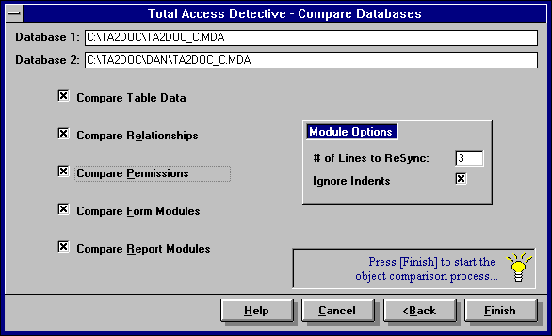
Figure 2: Choosing what to compare between versions of a database.
If you're concerned only with design changes. You'll want to clear the table data check box on this screen. Relationships and module comparisons are also optional since they're time-consuming and tend not to change very often. You can also specify how many lines of code TA Detective should scan when trying to resynchronize after finding a changed line of code.
When it's done comparing objects between the two databases, TA Detective creates an on-screen report of the differences. This has all the information you might need: the object and property names and the value of the property in each database. Figure 3 shows the report for a pair of sample databases. This report can also be printed out in several different formats.
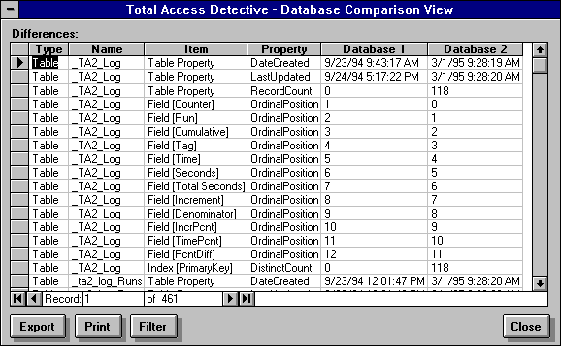
Figure 3: Differences between two databases.
Even More Information
TA Detective can also give you many other pieces of information about your two versions (using the primary key of the table to match the records). Since Access databases can be in an inconsistent state, there's compared-for example, a query based on a table that doesn't exist. A final report shows differences between macros and modules. As an added bonus, you can print the full listings of all your macros and modules, together with line numbers, as well as many other reports.
TA Detective supports a second mode of operation, one that lets you compare two objects in the same database. This is less useful for tracking changes or finding updated objects, but is still worth knowing about if you tend to archive multiple versions of an object in the same database. To use this mode of operation, load your database and then select Total Access Detective from the File, Add-Ins menu. You'll be prompted to select an object type, and then two objects of that type. Detective then runs its comparison routines on just those two objects. This tends to be a very fast process, since it's not looking at very much data. The result is a form, similar to that in Figure 3, enumerating any differences between the two objects.
Is it Worth It?
In general, TA Detective performs exactly as advertised. In practice, I've hit a few snags where TA Detective claims that a query can't be compared because its source tables are missing, even though they're present. In some of these cases, repairing and compacting the database seemed to fix the problem. This is probably an Access problem, possibly involving changes in the Jet engine, since it mostly seemed to happen when comparing very old objects with new ones. Action queries seem to be the main culprit.
The TA Detective Interface looks a bit nonstandard with its shadowed command buttons, and it's a bit dated with its Windows 3.x look, but these are just nit-picks. While there's no rocket science involved in comparing objects, a great deal of programming is required to do I right. Re-creating the behavior of TA Detective in your own program would be difficult. Modules and macros in particular require a strong understanding of Access internals to document at this level.
But why bother to re-create it? The price is right for an add-in that can pinpoint differences between multiple versions of your application. Until Access supports true version control, there will be a need for utilities such as this. An Access 95 version of TA Detective should be out by the time you read this.
Mike Gunderloy, MCSD, MCSE, MCT, is a contributing editor for Smart Access and a partner at Pyramid Computers, a Microsoft Solution Provider located in Brooklyn, New York. He has material appearing in Microsoft Access 95 Developer's Handbook (Sybex), Access 95 Power Toolkit (Ventana) and Mastering Microsoft Access 95 (Sybex). He is currently at work on a book on client/server computing with Access 95 and another on the use of OLE Objects across Microsoft applications.
Microsoft Access 365/2024 Version is shipping!

New X.6 Versions for Access 2016, 2013 and 2010
New Version 12.9 for
Access 2007
Version 11.8 for
Access 2003

Reviews
"Total Access Detective is well worth every penny, it will quickly pay for itself through savings in time and effort."
Tom Cryan, Denver Access User Group product review

Best Debugging Tool
Detective Info

Why Detective?
Additional Info




