


 New Features of Total Access Detective for Microsoft Access 365/2024, 2021 and 2019
Total Access Detective 2026 is its 10th major release. The most powerful database, object, module, and text comparison product for Access, Total Access Detective 2026, Version 26.0 is now available for Microsoft Access 365, 2024, 2021, and 2019, with X.6 updates for Access 2016, 2013, and 2010:
- Total Access Detective 2026, Version 26.0 for Microsoft Access 365, 2024, 2021, and 2019
- Total Access Detective 2016, Version 16.6 for Microsoft Access 2016
- Total Access Detective 2013, Version 15.6 for Microsoft Access 2013
- Total Access Detective 2010, Version 14.6 for Microsoft Access 2010
If you need to know exactly what changed between any two MS Access objects or databases, Total Access Detective is for you.
Enhancements
We've made many enhancements since the prior version:
- Microsoft Access 365/2024-2019 (32 and 64-bit Versions)
- Supports Features Introduced in Access 2019 and Later
- Filter Differences for Missing Fields, Controls, Sections and Groups
- Launch Database Comparison from the Add-in
- Enhanced Two Database Comparison Results Form
- Two Database Comparison Overview Form
- Improved Filtering of Differences by Object Type and Name
- New Buttons
- User Interface Enhancements
- New Manual and Help File
- Pricing and Microsoft Access Versions
- Previous Versions
Supports Both 32 and 64 bit Versions of Microsoft Access 365, 2024, 2021, and 2019
Total Access Detective includes add-ins for the 32 and 64 bit versions of Microsoft Access. It supports any operating system Access supports including Windows 11 and 10. The setup program automatically detects which version of Access is installed and installs the appropriate version.
Compares All Database Types Supported by Microsoft Access
It supports all the database types used by Microsoft Access 365, 2024, 2021, and 2019 including:
- ACCDB database formats (Access 365/2007-2024)
- Includes the new ACCDB databases supporting SQL Server tables with BigInt and Date Time Extended (DateTime2) columns
- Jet Engine/MDB formats and workgroup security (Access 2000, 2002, 2003, and 2007)
For older database versions including Access Data Projects (ADP), use Total Access Detective 2010 with Microsoft Access 2010.
New Control Types and Properties
Total Access Detective 2026 compares new control types introduced in Access 2019 and later such as the Modern Charts and improved Web Browser.
It also compares new object properties, macro syntax, and VBA module commands.
Supports ACCDB Databases with BigInt and DateTime2 Columns
Total Access Detective 2026 compares the latest, upgraded ACCDB databases that support SQL Server tables with BigInt and DateTime2 columns.
The object comparison results shows all the differences between two objects including every property. That can be overwhelming. A new checkbox filters the list to just the major differences:
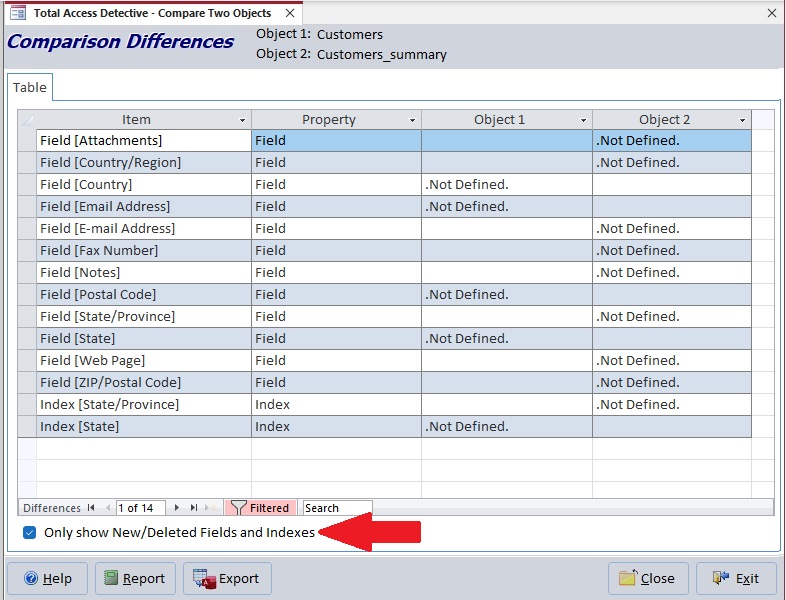
Filter Table Differences to Just Fields and Indexes in One Table But Not the Other
- Tables: Fields and Indexes in one table and not the other:

- Queries: Fields and Parameters in one query and not the other:

- Forms: Controls and Sections in one form and not the other:

- Reports: Controls, Groups and Sections in one report and not the other:

The Database Comparison program is normally launched from a shortcut on the Windows Start menu.
Users sometimes launch Total Access Detective from the add-ins menu intending to do this. The add-in is designed to compare objects in your currently opened database, rather than compare databases.
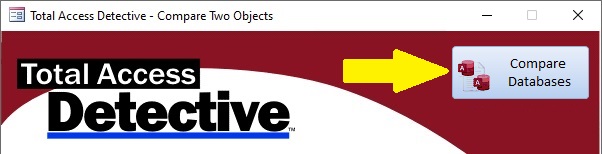
New Compare Database button on the Total Access Detective Add-in form
The new Compare Databases button launches the Database Comparison program and closes the add-in.
The form for comparing the Two Database Comparison results is simplified and enhanced.
The Overview, Unmatched Objects, and Errors buttons are moved to the top making it easier to understand the overall differences before getting into the details of the Object, Macro, Module and Data Differences. Unnecessary text below each button was removed.
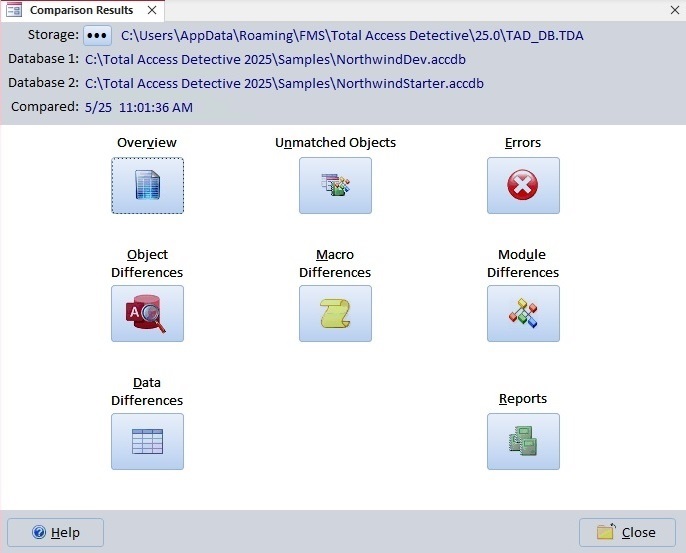
Two Database Comparison Results Form
The Browse button [...] to choose another database comparison is moved to the left from a File Open graphic that was on the far right.
The Overview provides a summary of the differences between the two databases. It adds a tab with a summary of the differences by object type:
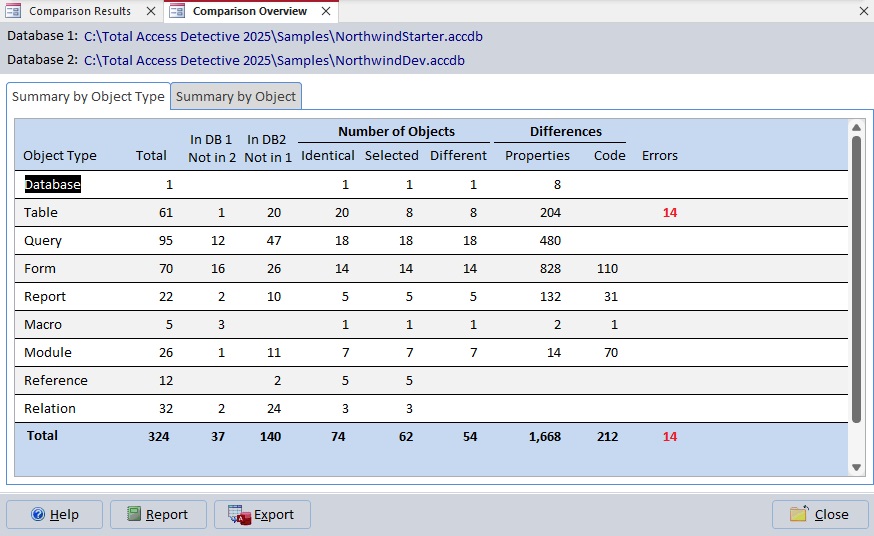
Database Comparison Overview Form with Two Summary Tabs
This lets you easily see the types of objects where you have the most differences.
Improved filtering of the differences by Object Type and/or Name to more easily select specific items.
Object Differences
The Object Differences form has a filter on the top with new combo boxes to more easily filter the list by object type and name (if no name is selected, all the differences for the selected type are shown):
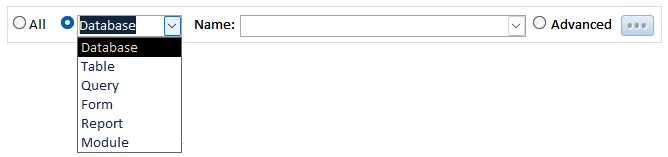
Filter Object Differences by Type and Name
Macro and Module Differences
Viewing the Macro and Module differences now has combo boxes to choose by object type and name:

Filter Macro and Module Code Differences by Type and Name
Two Object Comparison Swap Button
The Two Object Comparison selection has a new Swap button to flip Objects 1 and 2:
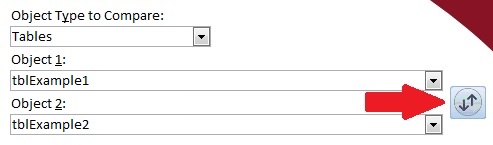
New Swap Button Flips Object Names
The Swap button also refreshes the combo box lists if any objects were added or deleted since the object type was selected
Text Comparison with Clear and Replace Buttons
The Text Comparison form lets you find differences between two blocks of text that you paste in or retrieve from files. Two new buttons let you update both blocks of text.
[Clear All] clears both and [Refresh All] updates both if they are from files on disk.

About Form to Check for Updates
The About form adds a new [Check for Updates] button to see if you have the latest version installed.

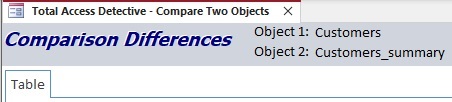
When viewing Two Object comparison results, the results were previously in the Objects tab. Now the tab name is the compared object type: Table, Query, Form, Report, Macro, Module, etc.
Forms have taller footers and wider buttons. Many button graphics are updated with more modern images and the new Access icon, like the Export button:
Button to Export Data to Your Access Database
The Unmatched Objects form shows the two lists with even widths when resized.
A new user manual and help file are provided.
Pricing and Microsoft Access Versions
Due to the differences within each version of Microsoft Access, Total Access Detective is specific to each version of Access.
|
Total Access Detective Pricing by Microsoft Access Version |
|||||||
| Microsoft Access Version | |||||||
Licenses |
Price |
365*/2024 2021, 2019 |
2016 |
2013 |
2010 |
2007 |
2003 |
|
Version |
26.0 |
16.6 |
15.6 |
14.6 |
12.9 |
11.8 |
|
| Single | $399 | Buy Now | Buy Now | Buy Now | Buy Now | Buy Now | Buy Now |
| 5-Seat | $1199 | Buy Now | Buy Now | Buy Now | Buy Now | Buy Now | Buy Now |
|
Upgrade from Another Version |
|||||||
| Single | $299 | Buy Now | Buy Now | Buy Now | Buy Now | Buy Now | Buy Now |
| 5-Seat | $899 | Buy Now | Buy Now | Buy Now | Buy Now | Buy Now | Buy Now |
|
Upgrade to Latest within the Same Version |
|||||||
| Update 16.6 | Update 15.6 | Update 14.6 | |||||
| Single | $249 | Buy Now | Buy Now | Buy Now | |||
| 5-Seat | $749 | Buy Now | Buy Now | Buy Now | |||
|
Premium Support Subscription |
|||||||
| Single | $299 | ||||||
| 5 Seat | $999 | ||||||
|
Also available as part of |
|||||||
|
Total Access Ultimate Suite Total Access Developer Suite |
|||||||
|
* Office/Access 365 Support |
|||||||
| Microsoft Office/Access 365 is a subscription that is constantly updated. Total Access Detective 2026, version 26.0, supports the version of Office/Access 365 when it was released. We cannot guarantee automatic support for all future releases with this version. We strive to provide upgrades to support new features as they become available. | |||||||
|
Licensing Information |
|||||||
| Total Access Detective is licensed on a per user basis.
Each user who runs the program must have a license. Read the License Agreement for details. |
|||||||
|
Runtime/Redistributable Version |
|||||||
| Not Applicable. | |||||||
Total Access Detective 2026 is the 10th major release of Total Access Detective since its debut in 1995 for Access 2.0.
Here are the major enhancements for some previous versions:
Microsoft Access 365/2024 Version is shipping!

New X.6 Versions for Access 2016, 2013 and 2010
New Version 12.9 for
Access 2007
Version 11.8 for
Access 2003

Reviews
"Total Access Detective is well worth every penny, it will quickly pay for itself through savings in time and effort."
Tom Cryan, Denver Access User Group product review

Best Debugging Tool
Detective Info

Why Detective?
Additional Info




