


Microsoft Access Temporary Variable (TempVars) Cross Reference
This report answers the critical question:
Where are my Microsoft Access TempVars created, assigned, and used?
Microsoft Access 2007 introduced TempVars which can be created in macros and modules. They can be referenced in all sorts of places such as queries, forms, and reports. That's convenient, but extremely challenging to manage.
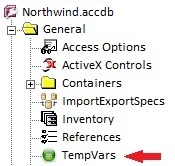
Fortunately, that's not a problem for Total Access Analyzer. Total Access Analyzer examines all your objects to document every use of TempVars to show them in the TempVars category (under General):
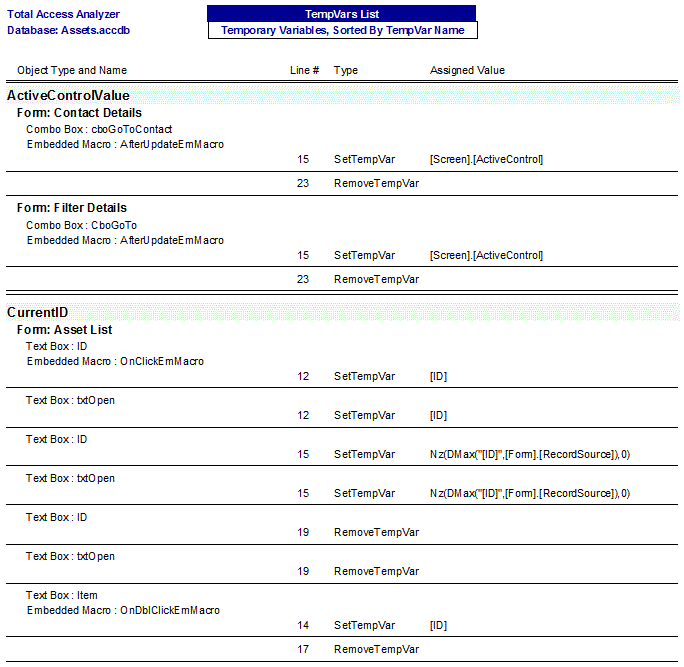
The information is also shown in the TempVars List report where you can see for each temporary variable, where it's created, assigned a value, removed, etc.:
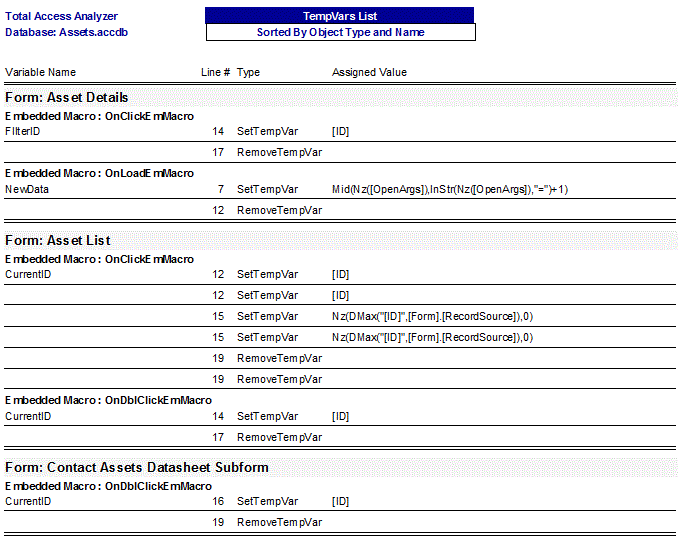
In the cross-reference report from the object perspective, you can see within each object, what TempVars they create, modify reference, and remove:
TempVars Analysis
In addition to documenting where TempVars are created, assigned, referenced, and removed, Total Access Analyzer also performs additional analysis to pinpoint potential issues:
- Undefined TempVars: These are critical errors where an object may be referencing a TempVars value but it's never created. You'll need to determine where to assign the value or remove the reference.
- Unused TempVars: These TempVars are created but never used. They won't cause a problem but it may indicate there was an intention to do something that did not occur. We suggest getting rid of these unnecessary assignments to clean up the application and make it easier to support over time.
See Finding and Deleting Unused Access Objects and Code for more details.
Microsoft Access 2019 / 365 Version is shipping!

Version 16.7 for
Microsoft Access 2016
Version 15.7 for
Microsoft Access 2013
Version 14.7 for
Microsoft Access 2010
Version 12.97 for
Microsoft Access 2007
Version 11.95 for
Microsoft Access 2003
Version 10.8 and 9.8 for
Access 2002 and 2000

Awards and Reviews



"Total Access Analyzer is an amazing product that I've relied on and recommended for years. It's a huge time saver."
Sal Ricciardi, Programming Writer, Microsoft Corporation
Analyzer Info


Why Analyzer?
Additional Info




