



 Total Access Statistics Preview Version for Microsoft Access 2010
Thank you for your interest in Total Access Statistics for Microsoft Access 2010.
The preview period has ended and Total Access Statistics 2010 is shipping.
Download the trial version or purchase the retail product.
This FREE Preview version gives you the opportunity to evaluate the product, provide suggestions and report any errors before the product ships.
 Please
read this entire document prior to downloading and installing the software.
Please
read this entire document prior to downloading and installing the software.
About Total Access Statistics
Total Access Statistics offers a wide range of statistical functions to analyze your data. Your data can be in Access tables, linked from other sources such as SQL Server, or from a query. Analyze multiple fields and an unlimited number of records at one time. You can even analyze data from multi-table select queries or crosstabs.
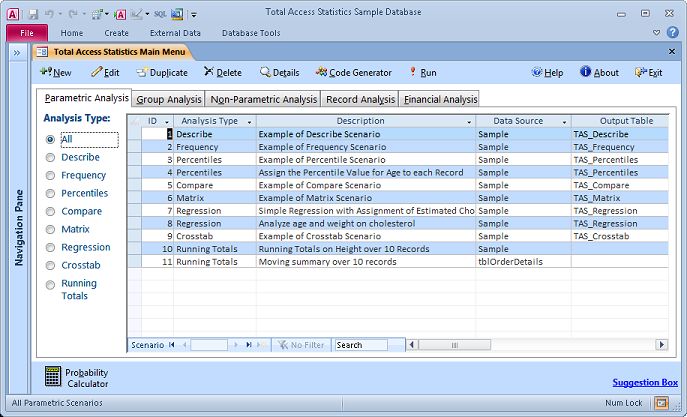
Best of all, the results are provided in tables which you can further analyze or add to your queries, forms, and reports. You'll be amazed at the powerful statistical analysis you can generate within Microsoft Access without being a mathematician or statistician!
What's New in the 2010 Version
The latest version of Total Access Statistics introduces support for Microsoft Office Access 2010, and includes these enhancements:
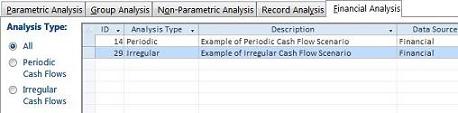 New financial calculations for
cash flow analysis of regular and date specific payments. Easily calculate present value (PV), net
present value (NPV), future value (FV), internal rate of return (IRR) and modified internal rate of return (MIRR).
New financial calculations for
cash flow analysis of regular and date specific payments. Easily calculate present value (PV), net
present value (NPV), future value (FV), internal rate of return (IRR) and modified internal rate of return (MIRR).- Support for the 32 and 64 bit versions of Access 2010 with separate add-ins and redistributable runtime libraries for each.
- A new Access 2003 MDE runtime library for legacy support.
Important Preview Information
The Total Access Statistics Preview is designed to provide you with an advance look at the product, as well as the opportunity to submit your requests and needs to the FMS development team before the product is finalized.
Keep in mind that the preview is pre-release software. Before downloading and installing the preview, please be aware of the following:
- This preview software is not release quality, and it should not be used in production applications. Before installing or using, be sure to back up any important data.
- This preview version expires and ceases to function on September 1, 2010. After the expiration date, you will need to obtain the retail version of the software. Contact FMS for more information on obtaining retail software.
- The shipping version includes a professionally printed user manual which is not included here. The manual is available in the Preview version through the online context sensitive help.
Installing the Preview Software
To install the preview version of Total Access Statistics, follow these steps.
- Download the appropriate Setup File:
- Total Access Statistics 2010 Preview (32-Bit)
- Total Access Statistics 2010 Preview (64-Bit)
- Run the setup program from your local computer.
- Be sure to read the contents of the README file installed by the setup program for important preview information.
Uninstalling the Preview Software
Total Access Statistics conforms to the Windows uninstall standards. To uninstall, simply:
- Open the Windows Control Panel
- Select Add or Remove Programs
- Select Total Access Statistics
- Remove it
Microsoft Access 365/2016 shipping!

Version 14.1 for
Microsoft Access 2010
Version X.9 for
Microsoft Access 2007 and 2003
Version X.8 for
Microsoft Access 2002, 2000, and 97

Reviews
"Total Access Statistics performs a wide range of data analysis right inside Access. The product includes a Statistics Wizard to perform parametric, group, non-parametric, record analysis and more. The results are placed in Access tables that you can integrate into your forms and reports."
Alison Balter, Author

Statistics Info
 FAQs
FAQs
Additional Info




