



 New
Features of Total Access Analyzer for Microsoft Access 2007, Version 12.0
New
Features of Total Access Analyzer for Microsoft Access 2007, Version 12.0
This is no longer the latest version of Total Access Analyzer 2007.
Existing 12.X customers can upgrade to Total Access Analyzer 2007, Version 12.97 for a nominal fee.
For more information on the new features, visit Total Access Analyzer 2007, Version 12.97.
The world's most popular Access product is now available for Microsoft Office Access 2007. Total Access Analyzer 2007 builds on its heritage of helping Access enthusiasts create better Access solutions with a wide range of new features.
Microsoft made a big investment to create Access 2007 and added a lot of great new features with significant changes to objects, properties, VBA code, the user interface, an entirely new database format, with new field types and embedded macros.
So we now support MDB, ADPs, and the new ACCDB database formats. The user interface can be in tabbed view or traditional windows. Layer on top of that the differences between Windows XP and Vista, and you'll quickly see the number of permutations our developers and QA staff needed to address.
We've added many enhancements based on our experiences and the recommendations of our customers. Thank you very much!
- Supports the new ACCDB (Access 2007) database format in addition to the MDB and ADP formats
- Documents and cross-references the new embedded macros in Access forms and reports
- Supports new Macro Commands, VBA Commands and Property Values
- Documents saved import/export specifications
- Documents links to SharePoint
- Documents the use of variables tied to the TempVars object
- Documents a variety of new properties, Access options, and many other settings including localization of property values to your version of Access
- Completely redesigned user interface to support the sleeker Office/Access 2007, Vista/XP color schemes, and look and feel
- Support for your database's Document Windows Options set to traditional overlapping windows or the new tabbed object display
- Resizable forms for either Windows option
- Alternating row colors for datasheets
- The use of transparent buttons with graphics
- Support for datasheet filtering throughout the application from selecting objects to document, reports to print, or viewing results
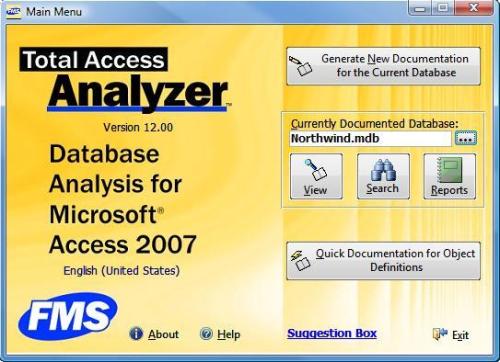
Main screen shows the context of the currently documented database and your ability to view, search, and print reports for it.
You can also open it without closing your current objects.
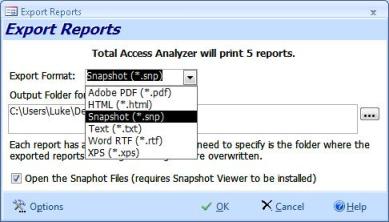
Individual or multiple reports can be exported to formats such as Adobe PDF, HTML, Snapshot, Text, RTF, or XPS to a folder you specify:
Reports can be sent to the new Report View which supports your ability to filter the results interactively
There are 353 professional quality reports. Here are some of the 24 new reports:
- New Access Options reports (completely different from the Access 2003 options under Tools, Options)
- Import Export Specifications
- Embedded macro listings
- Objects embedded macros cross-reference
- TempVars assignments and cross-reference
- Objects with Identical SQL and RecordSource
- Unused forms, reports, and code
- Enhanced Database Summary reports
After documentation, reports without data are not listed to make it easy to see what's available.
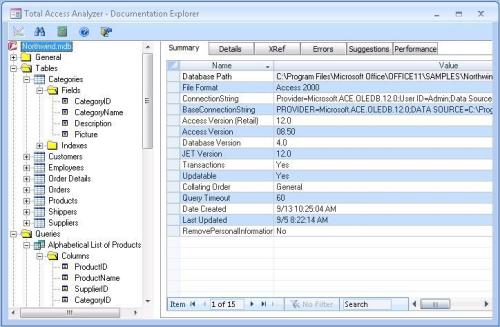
- One click loading of the current object in design view. Whether it's from the Diagrams, XREF, Errors, Suggestions, or Performance Tips tabs, you can press Alt+D and put it in design mode to immediately review the object or module for the changes to make.
- Significantly improved performance when viewing results, and looking at detailed property lists for one object or across all objects of one type
- Improved maximized mode with splitter bar between panes
Total Access Analyzer detects 285 specific types of errors, suggestions, and performance tips for your database. Here are some new ones
- Eliminate/Consolidate duplicate queries: Identical SQL Analysis to determine if the same SQL string is used across multiple queries, or the record source and row source of forms and reports
- Check and recommend the settings of the new Access options like tabbed view, Search Bar, datasheet design change option, etc.
- Forms with navigation bars should have a custom Navigation Caption
- Command Buttons should show the Hyperlink Hand on mouse hover.
- Datasheet and continuous forms should take advantage of the new alternating background color option
- Unused forms and reports
- Module analysis:
- Use of old constants from pre-Access 97 syntax
- Procedures with exits in the middle of its body which could bypass cleanup code at the end of the procedure
- Date fields with input masks (the Format property should handle this)
- Forms with the Moveable property set to No
- New Access option for database picture property storage to reduce database size
- Forms with unnecessary scroll bars
Here's a complete list of Best Practices detected by Total Access Analyzer.
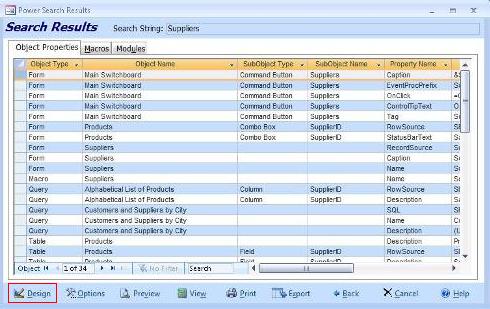
Search lets you find any string among the documented objects, macros, and modules. While viewing the search results, you can put the object in the current record into design mode by pressing Alt+D or the Design button:
- Detects table and query references from the open command of ADODB recordsets and adds this to the Object XREF views and reports
- Detects explicit control references from code (e.g. Form_MyForm.txtValue) with new Object XREF reports
- Documents the TempVars object definition and usage
When creating new documentation, the Documentation Wizard lets you work more efficiently. It:
- No longer requires your code to be compiled (with a warning)
- Adds a Finish button so you can skip the last two pages after you select your objects to document
Total Access Analyzer addresses the limitations imposed by Vista and User Access Control. Rather than storing output databases for your documentation in the Total Access Analyzer folder by default, it now stores it in your Application Data folder.
Plus many other documentation and performance enhancements to make Total Access Analyzer better than ever! There's even a new 164 page, professionally printed user manual.
Pricing and Microsoft Access Versions
Due to the differences within each version of Microsoft Access, there is a separate version of Total Access Analyzer for each version of Access.
|
Total Access Analyzer Pricing by Microsoft Access Version |
|||||||
| Microsoft Access Version | |||||||
| Licenses | Price | 365*/2019 | 2016 | 2013 | 2010 | 2007 | 2003 |
| Version | 17.1 | 16.7 | 15.7 | 14.7 | 12.97 | 11.95 | |
| Single | $299 | Buy Now | Buy Now | Buy Now | Buy Now | Buy Now | Buy Now |
| 5-Seat | $899 | Buy Now | Buy Now | Buy Now | Buy Now | Buy Now | Buy Now |
|
Upgrade Between Access Versions |
|||||||
| Single | $199 | Buy Now | Buy Now | Buy Now | Buy Now | Buy Now | Buy Now |
| 5-Seat | $599 | Buy Now | Buy Now | Buy Now | Buy Now | Buy Now | Buy Now |
|
Update to the Latest Release within the Same Version |
|||||||
| Update 17.1 | Update 16.7 | Update 15.7 | Update 14.7 | ||||
| Single | $149 | Buy Now | Buy Now | Buy Now | Buy Now | ||
| 5-Seat | $449 | Buy Now | Buy Now | Buy Now | Buy Now | ||
|
Premium Support Subscription |
|||||||
| Single | $299 | ||||||
| 5 Seat | $999 | ||||||
|
Also available as part of |
|||||||
|
Total Access Ultimate Suite Total Access Developer Suite |
|||||||
|
* Office/Access 365 Support |
|||||||
| Microsoft Office/Access 365 is a subscription that is constantly updated. Total Access Analyzer 2019, version 17.1, supports the version of Office/Access 365 when it was released. We cannot guarantee automatic support for all future releases with this version. We strive to provide upgrades to support new features as they become available. | |||||||
|
Licensing Information |
|||||||
| Total Access Analyzer is licensed on a per user basis.
Each user who runs the program must have a license. Read the License Agreement for details. |
|||||||
|
Runtime/Redistributable Version |
|||||||
| Not Applicable | |||||||
Additional Resources
- For a quick overview of Total Access Analyzer, Take the Product Tour
- Version X.9 Enhancements for Microsoft Access 2007 and 2003
- Version X.8 Enhancements for Microsoft Access 2003, 2002 and 2000
- Total Access Analyzer Home
Microsoft Access 2019 / 365 Version is shipping!

Version 16.7 for
Microsoft Access 2016
Version 15.7 for
Microsoft Access 2013
Version 14.7 for
Microsoft Access 2010
Version 12.97 for
Microsoft Access 2007
Version 11.95 for
Microsoft Access 2003
Version 10.8 and 9.8 for
Access 2002 and 2000

Awards and Reviews



"Total Access Analyzer is an amazing product that I've relied on and recommended for years. It's a huge time saver."
Sal Ricciardi, Programming Writer, Microsoft Corporation
Analyzer Info


Why Analyzer?
Additional Info




