Files Created in Microsoft Access 2007 SP1 Do Not Run Under the Original Access 2007 Version
by Luke Chung, President of FMS, Inc.
You create a Microsoft Access 2007 database (.accde, or .mde or .ade) file to give to your users. It runs fine on your machine and for several other users, but some people get this error dialog as soon as they run it:
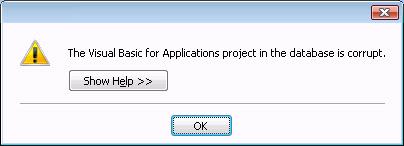
For the life of you, you can't figure out why. The message says the VBA project is corrupt, but the same file runs fine on other machines. And since it's an MDE/ACCDE/ADE file, the user can't modify it making it doubly confusing how they could have corrupted it.
In fact, it has nothing to do with VBA or database corruption. Your database is fine. It just won't run on that machine.
In January 2008, Microsoft released hotfix service patch SP1 for Microsoft Office 2007. This included SP1 for Microsoft Access 2007 and fixed a variety of issues.
Unfortunately, a side effect of this new version is a break of backward compatibility of MDE, ACCDE, and ADE files created under SP1. Patches in prior versions of Access never broke backward compatibility within their own version, so this is a new challenge for Access developers.
.MDE, .ACCDE, and .ADE files are created from *.MDB, *.ACCDB and *.ADP database formats respectively. These files allow developers to create databases for users while preventing users from modifying form and report designs and module code. It's also a smaller file.
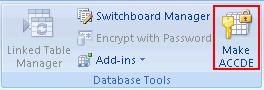
For example, an ACCDE file is built in Access 2007 by opening an ACCDB file and choosing the Make ACCDE item from the Database Tools ribbon:
You can tell if you have SP1 installed by selecting Access Option from the Office button on the far left, and selecting "Resources" on the left border menu. In the About section at the bottom, the version number is listed as 12.0.6211.1000.
The original shipping version of Microsoft Office Access 2007 is 12.0.4518.1014.
Programmatically, within your database, you can run this code to determine the current build of Access 2007:
- Application.Build()
This returns 4518 for the original version and 6211 for SP1. The Application.Version() command tells you the Access version (12.0).
Of course, the programmatic feature doesn't help if your database won't even start.
There are a few ways to solve this problem:
-
Make sure all your users are upgraded to the SP1 version of Access 2007.
-
If you can't control the Access 2007 version your users are running, you need to create your MDE/ACCDE/ADE file in the original Access 2007 version. They will run fine under SP1. The hassle is that you'll need to keep a separate machine with the original version of Access 2007 and not allow it to receive automatic updates from Microsoft.
Hope this helps. Good luck!
Strategic Overview
Microsoft Access within an Organization's Database Strategy
How many simultaneous Microsoft Access users?
Blaming Microsoft Access instead of the Developer
History of Access
Microsoft Access Version Feature Differences
Microsoft Access Versions, Service Packs and Updates
Microsoft Office 365 Access Update Version Releases
Best Practices
Taking Over Legacy MS Access Databases

Winner of Every Best Access Add-in Award
Table Design
Set AutoNumber Starting Number Other than 1
Avoid Unnecessary or Duplicate Indexes
Query Design

Form Design
Copy Command Button and Keep Picture
Module VBA to Forms and Controls
Subform Reference to Control Rather than Field
Report Design
Suppress Page Headers and Footers on the First Page of Your Report
Annual Monthly Crosstab Columns
Design Environment
Add Buttons to the Quick Access Toolbar
Collapse the Office Ribbon for more space
VBA Programming
Avoid Exits in the Body of a Procedure
Send Emails with DoCmd.SendObject
Source Code Library

VBA Error Handling
Error Handling and Debugging Techniques
Error Number and Description Reference
Performance Tips
Deployment
Remote Desktop Connection Setup
Terminal Services and RemoteApp Deployment
Missing Package & Deployment Wizard

System Admin
Database Corruption
Remove 'Save to SharePoint Site' Prompt from an Access Database
Class Not Registered Run-time Error -2147221164
SQL Server Upsizing

Microsoft Access to SQL Server Upsizing Center
When and How to Upsize Access to SQL Server
SQL Server Express Versions and Downloads
Cloud and Azure
Deploying MS Access Linked to SQL Azure
SQL Server Azure Usage and DTU Limits
Visual Studio LightSwitch
Additional Resources
Connect with Us
 Email Newsletter
 Developer Team Blog
 Facebook
 X/Twitter
 Support Forum & Tickets


