Microsoft Access within an Organization's Overall Database Strategy
by Luke Chung, President of FMS, Inc.

There is a lot of confusion over the role of Microsoft Access within an organization. Sitting between the power of Excel and client server databases, Access extends from simple end-user tasks to mission critical operations. This paper hopes to cover the issues surrounding Access:
- Why it's become problematic in large organizations including the Sarbanes-Oxley Act (SOX)
- Where it's appropriate to be used, and
- Where it's not
This paper also focuses on the overall principle that most MS Access applications that become mission critical did not start out that way, but evolved into that role. Why that happens, why it's natural and unstoppable, and how to address it.
Database Evolution
Software applications share many similarities with biology and Darwinian forces. Some applications evolve and survive, while others go extinct. Anticipating, rather than fighting, the inevitable process of database evolution and natural selection is the key to using MS Access effectively within an organization.
 It's all about evolution. The database needs of an organization are unpredictable and change over time.
Microsoft Access solves many database problems, but not all, and neither do other tools. What Access offers is the best solution for its range of capabilities.
As the most popular database product in the world, MS Access clearly dominates one of the most important segments of the database ecosystem.
It's all about evolution. The database needs of an organization are unpredictable and change over time.
Microsoft Access solves many database problems, but not all, and neither do other tools. What Access offers is the best solution for its range of capabilities.
As the most popular database product in the world, MS Access clearly dominates one of the most important segments of the database ecosystem.
Financially, it comes down to how much it costs to build database applications in Access vs. other platforms and the tradeoffs. Access applications are inherently cheaper to build than more sophisticated platforms. So if an opportunity warrants a $25,000 application and Access can do it when more expensive platforms cannot, the choice is simple:
- Use Access to create the application with its inherent limitations
- Use more expensive platforms and take a loss
- Don't do it and give the opportunity to a competitor (or don't service the customer, patient, etc.)
When formulating the database strategy of an organization, it's helpful to think of individual databases evolving over time. Healthy database applications are not just created once but change and grow. Bad ones go extinct, and sometimes even good ones die because their environment (market) changes. Meanwhile mission critical applications sometimes appear from unexpected sources.
Millions of databases are created in Excel spreadsheets each year, but only a tiny percentage "graduate" to the next level: Microsoft Access. Similarly, only a tiny percentage of Access applications graduate to a more sophisticated solution. In the interim, a huge number of database needs are solved completely by Access. Access is simply the best at what it does.
An IT manager needs to understand and use Access tactically, and anticipate that some Access applications will migrate over time. This is not an indictment on Access, but rather the natural process of database evolution as the organization's needs change. Sure, it would have been better to build THAT Access application with a more sophisticated platform from the beginning, but it was impossible to predict it would be that important when it was first created. One could also argue that the original designer then could not envision the system needs today. Time and the process is what brought us to where we are today, not the original idea.
Similarly, is it possible to predict which 2% of databases created this year need to migrate three years from now? Most will run perfectly fine in Access forever or go extinct. Making a big investment today makes no sense when a simpler, less risky Access solution is possible. Let time determine which databases evolve and require additional investment to take them to the next level. The key is to anticipate this and not be surprised when it happens.
Even when Access applications evolve to another platform, Access scales by supporting the migration of Jet to SQL Server while preserving the application development investment. The features developed for Access can be rolled into the new platform guaranteeing the success of the new system (or at least minimizing end-user objections). In that case, Access proved to be a great prototype.
The savvy IT manager learns when Access is effective and when it's not. If it can be done in Access, the ROI is superior to alternate technologies. Taking advantage of the strengths of Access gives your organization a significant competitive advantage both financially and in response to user, market, and customer conditions.
Overview
- There are Many Database Needs
- Database Pyramid
- Database Evolution
- Database Challenges in an Organization
- Strategic Mission and Vision
- Access Fills an Important Segment
- Database Solution Costs
- Advantages of Access
- Limitations of Access
- Why Access Is Important
- Exploring the Myths of Access Limitations
- Impact of the Sarbanes-Oxley Act (SOX)
- Why IT Departments Hate Access
- Is Access a Professional Database?
- Using Access Strategically
- Conclusions
Total Access Detective 2026
Find Differences between Access databases and objects!
Total Access Memo 2025
Add Rich Text Memos to Forms and Reports!


Updated Microsoft Access to SQL Server Upsizing Center with whitepapers, resources, and SQL Server Express Downloads
 Latest Newsletter
 Blog with us
 Follow us on Twitter
Some databases are critical to the survival of an organization while others are simply quick and dirty systems for ad-hoc analysis. No matter how large or small the organization, databases are used at a variety of levels for a variety of reasons:
Enterprise Level
These are mission critical applications that the entire organization requires for its survival. Examples include accounting systems, customer transaction tracking, high volume data processing, or other critical systems vital to the organization's ability to complete its mission. In large organizations, this is often considered the function of the data center. Critical issues here include processing large amounts of data, maintaining historical data and legacy systems, accuracy, security, and administrative depth (backups, disaster recovery, etc.)
Department Level
Applications built for departments are less critical for the survival of the entire organization. Although these may still include important data center applications, other applications may be managed in the department itself. Department level applications are usually created by professional developers and maintained by dedicated personnel. They often tap into or pass data into the data center repositories.
Workgroup/Team Level
Workgroup applications focus on the needs of a smaller group of people working together. These applications can often change rapidly to meet the needs and challenges the workgroup faces either internally or from external market forces. Workgroup applications tend to be PC based (not mainframe) and are often controlled by the line of business using it. These applications often involve professional developers, although many instances of applications created by power users and non-developers exist. These applications often retrieve data from data center systems, but do not commonly send data back. Data analysis, report generation, and managing the needs of the workgroup to perform its functions are common examples.
Individual and Small Groups
On individual PCs, many people create their own databases in Excel and Access. These tend to be single user applications that have relatively short life spans. Their purpose is to simplify the work of the individual or small group of people who created it. Most of these applications are created by people whose primary job function is not programming.
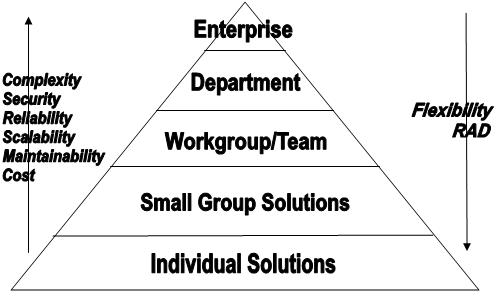
Database Pyramid (number of database solutions for each level)
The vast majority of database solutions are simple. As systems tackle larger and larger problems, the number of applications an organization has or can afford decreases.
At the low end, very flexible and rapid application development (RAD) solutions are used. Life cycles are short, bureaucracy and structure limited, and any mistakes are not life threatening to the organization. Costs are relatively low.
Moving up the pyramid, the solutions become more and more sophisticated and critical. The number of users increase, security and reliability become more important, and solutions need to scale. Maintainability is more important because systems are built by many people and live beyond their participation. More time is spent designing systems because more people and issues are touched. When changes are made, the complexity and critical nature of the system requires longer implementation, testing and documentation. All this drives costs up as mistakes become more and more expensive, and the organization's survival is more and more dependent on them.
At the top end, if you lose a record, you can threaten the life of the organization and literally cost your job. At the bottom, people lose records, tables, and entire documents and databases without significant negative impact beyond themselves. The differences in value impacts costs and development time.

Simple Databases May Evolve Into Sophisticated Ones
Most database applications start from the bottom of the pyramid. Someone creates a spreadsheet or small database, finds it useful and shares it with a few people. They like it and more features are added. More and more people rely on the system, and over time, the simple solution that someone created for their personal use becomes mission critical for the department or enterprise.
Very Few Databases Evolve to the Next Level
It's important to remember that this is the exception and not the rule. For every application that successfully "evolves" from one level to the next, hundreds if not thousands are created which never evolve. Many are discarded because they weren't useful or the environment (business) changed, while others remain perfectly fine never needing to migrate.
Hardware Also Evolves
The types of business (database) problems an organization faces remain fairly static over time compared to the hardware gains following Moore's Law. Problems that required mainframe solutions two decades ago now run comfortably on laptops. When it comes to performance, time is on the side of the solutions at the bottom of the pyramid. Over time, more and more database challenges are solved by that segment, while the top of the pyramid goes after problems that were previously beyond the reach of computing or budgets.
Evolution is Unpredictable
It would of course be better and cheaper to develop the mission critical applications of tomorrow correctly today, but that's usually not possible. It's very difficult to predict which of the multitude of small databases today will become mission critical applications years from now. What's created or envisioned today for those databases, may not be what's needed in the future or what makes them mission critical later. An organization's requirements evolve over time, and its infrastructure does too. It's the evolution of the databases themselves that make them mission critical, not the original vision of the author.
Anticipate Evolution
Successful databases evolve over time. A good IT strategy embraces, not fights, this natural trend. Anticipating the transition is part of a successful database strategy. That means preparing for times when applications need to migrate to new platforms or be completely re-written.
When these occur, one should not blame the existing platform, but rather celebrate the success of the organization and the system that took it to the next level. The existing system should be considered a great prototype for the next system since the business needs are well defined and users accept it. This significantly reduces the risk of the new system in a world where expensive systems are never delivered or built or fulfill a fraction of their original intent.
The transition is also an ideal opportunity to add new features and "clean up" the system since after many years and enhancements, many original assumptions were wrong. This need would probably exist even if the system were created on the more sophisticated platform originally. However, it may not have evolved as quickly in that environment, so one may never know if it would have been as successful.
Every organization faces a myriad of database challenges to fulfill their mission. These include:
- Maximizing return on investment (ROI)
- Managing Human Resources
- Rapid deployment
- Flexibility and maintainability
- Scalability is nice, but secondary
 Return on Investment (ROI) is Critical
Maximizing ROI is more critical than ever. Management demands tangible results for the expensive investments in database application development. And many database development efforts fail to yield the results they promise. Choosing the right technology and approach for each level in an organization is critical to maximizing ROI. This means choosing the best total return, which doesn't mean choosing the cheapest initial solution. This is often the most important decision a CIO/CTO makes.
Managing Human Resources
Managing people to customize technology is very challenging. The more complex the technology or application, the fewer people are qualified to handle it and the more expensive they are to hire. Turnover is always an issue, and having the right standards in place is critical to successfully supporting legacy applications. Training and keeping up with technology is also very challenging.
Rapid Deployment is Critical
Being able to create database applications quickly is important not only for reducing costs, but responding to internal or customer demands. The ability to create applications quickly provides a significant competitive advantage. The IT manager is responsible for offering alternatives and making tradeoffs to support the business needs of the organization. By using different technologies, you may be able to give the business decision makers choices such as a 60% solution in three months, a 90% solution in 12 months, or a 99% solution in 24 months (instead of months, it could be dollars). Sometimes time to market is most critical, other times it may be cost, and other times the features or security most important. Business changes quickly and is unpredictable. We live in a "good enough" rather than perfect world, so knowing how to deliver "good enough" solutions quickly gives you and your organization a competitive edge.
Flexibility and Maintainability is Important
Even with the best system design, by the time multi-month development efforts are completed, needs change. Versions follow versions, and a system that's designed to be flexible and able to accommodate change can mean the difference between success and failure for the users' careers.
Scalability is Necessary, but Often Secondary
Systems should be designed to manage the expected data and more. But many systems never get completed, get thrown away soon after use, or change so much over time that the initial assessments are often wrong. Scalability is nice, but this is often less important than having a solution quicker. If the application successfully supports growth, scalability can be added later when it's financially justified.
Matching the Correct Technology to the Solution Maximizes Returns
We've already seen how different levels of an organization have different database needs. Choosing the right technology and approach for each level impacts the ability of that level to perform long-term, and the returns it generates.
Using Multiple Tools is Critical to Success
An organization faces a variety of database challenges. No tool solves every issue. Many tools and approaches are available each with their own strengths and weaknesses. Some manage large amounts of data in a very structured and secure manner. Other tools mange a relatively small amount of data in an unstructured, minimally secure, yet highly flexible manner. Depending on the objectives, one tool may be superior to the other.
 Military Analogy
Like a CIO/CTO, a commanding general has many types of battles to fight and multiple weapons to use. The general wants the most powerful weapons but would be handicapped without tanks, artillery, and rifles. That's because all battles aren't the same. Some require massive resources while others require infantry. Choosing the right weapon for a particular challenge is critical to meeting objectives, managing budgets and resources, and responding to the unique requirements of each situation.
Being Prepared and Not Surprised
Part of the strategy is to be prepared and not surprised when these applications evolve. Any organization can support information worker solutions if the proper planning and budgets are in place to do so. The military has backup forces ready in anticipation that they'll be needed. A fire department doesn't recruit employees when they receive a call that there's a fire. The firemen are already on staff and ready to go, even though they don't know which building will burn next.
 Lots of Data is Stored in Excel
Even though Excel is not a database, in many organizations, people store more data in spreadsheets than any other platform. This drives IT professionals crazy, but works. Decision makers need to analyze data and they know Excel. This is one of the greatest benefits of desktop computing.
Although Excel is not a relational database, it solves many simple database problems completely. That's because many database problems can be solved with simple database solutions. Only a tiny percentage of Excel spreadsheets ever reach the limits of Excel, but when they do, many should migrate to Access.
 Microsoft Access Fills a Large and Important Segment
The success of Access as the most popular database in the world is a testament to its capabilities and the pervasive need for database solutions by productivity workers. Access is the first weapon of choice when it comes to relational databases because of its ability to quickly create useful database solutions.
It may not have all the features scalability, performance, reliability, and security of more sophisticated solutions, but for many situations, those features are irrelevant or secondary to what Access offers. Access offers an excellent solution for database challenges facing individuals, small teams, and workgroups across a network.
The number of database challenges within an organization that can be solved by Access is much larger than solutions solved by more complex and expensive solutions. And over time, with the drop in hardware prices and increases in performance, more and more database situations are solved by Access.
Different database problems require different solutions. If an organization's only database response is a $200K+ solution, it cannot profitably manage opportunities worth less than that. That may or may not be a problem today, but it gives competitors an opportunity if they have less expensive solutions. Over time, some of those small opportunities grow into big ones.
The cost of solutions and the solutions themselves vary significantly by the platform selected. Here are some ballpark numbers:
| Platform | Average Cost |
|---|---|
| Excel | $ 500 |
| Access Individual | $ 3,000 |
| Access Simple Multi-user | $ 10,000 |
| Access Workgroup/Department | $ 50,000 |
| VB6 and Jet | $ 200,000 |
| VB6/Visual Studio .NET/Java and SQL Server | $ 500,000 |
| Oracle, IBM db2 | $ 2,000,000 |
| SAP, PeopleSoft, etc. | $ 10,000,000+ |
We can argue over the fact that there are million dollar Access applications and $20,000 .NET applications, but that misses the point. These numbers show order of magnitude for a large organization, and what they generally spend for solutions on those platforms.
It is worthy to note that solutions created for the first three platforms (Excel and simple Access applications) are often created by non-IT professionals. Managers, analysts, and administrators create these solutions without IT budgets or guidance. It's simply part of their job. Most of these solutions would rarely make economic sense if IT staff fulfilled them, nor would they be able to create them in a timely manner. That said, many applications created by non-IT professionals are not maintainable and suffer from poor design.
Once you get into workgroup applications, defined budgets, design processes and more structured development efforts occur, and people specializing in application development get involved. But even at this point, costs vary widely based on the platform selected.
Quantity of Database Solutions
As illustrated in the Database Pyramid, there are a lot more small databases than large ones. Here's an estimate of the relative number of database solutions by platform in a large organization:
| Platform | Quantity |
|---|---|
| Excel | 50,000 |
| Access Individual | 5,000 |
| Access Simple Multi-user | 1,000 |
| Access Workgroup/Department | 500 |
| VB6 and Jet | 100 |
| VB6/Visual Studio .NET/Java and SQL Server | 50 |
| Oracle, IBM db2 | 25 |
| SAP, PeopleSoft, etc. | 10 |
Quantity vs. Cost
When you compare quantity and cost, there's an exponential relationship between the number of solutions and average cost. Here's the comparison on a logarithmic scale:
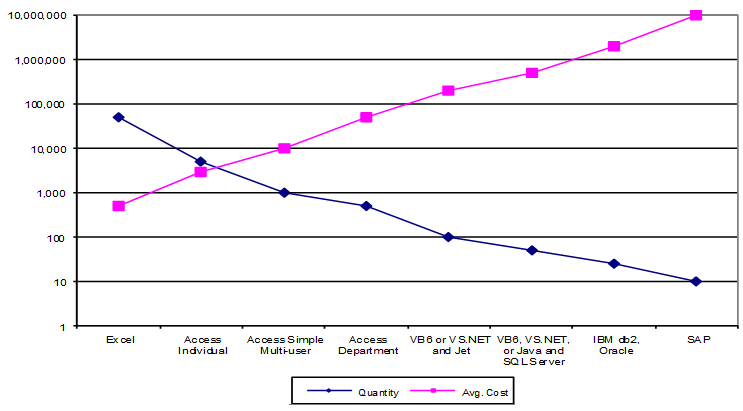
Not surprisingly, as the cost of each implementation increases, the number of solutions decreases. It's the CIO/CTO's responsibility to survey the entire spectrum of database challenges facing the organization and deploy the appropriate technology to meet them given limited resources and time.
MS Access is the most popular database program because non-IT professionals can cost-effectively solve a wide range of database problems with it, and professional developers can create very sophisticated multi-user solutions.
Tremendous ROI
If it can be solved in Access, it's probably cheaper than alternative solutions which maximizes ROI
Rapid Application Development
The Access development environment lets you create results fast. Access solutions often require significantly less code than alternatives. It's a great platform for prototyping.
Integrates with Microsoft Office
Access is part of Office and integrates with the most popular interface users use: Office. Enabling users to view data and exporting it into Excel or Word (or users simply pasting it themselves) is extremely powerful to knowledge workers.
Great for Data Entry – Windows Still Beats Web
Somehow web users are trained to accept behavior that would cause howls in Windows applications. For instance, changing the quantity and pressing [Update] to refresh total sales. Access easily (cheaply) supports this, copying and pasting records, displaying multiple one-to-many relationships, and other basic features (e.g. spell checking) that provide a much friendlier and richer data entry experience than Web solutions.
Interfaces with Lots of Database Formats
Access links to all sorts of data sources from legacy DOS databases like dBase, Paradox, and FoxPro, to ODBC data from SQL Server, Oracle, DB2, etc.
Powerful Query Designer
The Query Designer lets people create sophisticated multi-table queries visually and graphically without having to learn SQL. Access queries can also reference VBA functions and user defined functions directly in their queries for very sophisticated analysis and updates. Advanced users who know SQL, can also write SQL queries directly.
Excellent Report Generator
The Access report generator is second to none. Sub-reports are extremely useful for showing multi-table relationships. Combine this with Access' ability to link to many data sources and you have a great report generator. Many desktop database applications have significant report generation features.
Web reports still don't compare or print on paper properly, even with a lot more effort.
Approachable Development Environment
The VBA IDE is the same as VB and offers a very productive development environment. You can even edit and save code while debugging which is a real time saver.
Access Solves Many Solutions with Less Code than Alternatives
The less code required for a solution, the better. It's easier to create and easier to maintain. N-tier solutions are definitely not RAD, and not beneficial if you never need to share your data.
Ideal for Network Solutions
Access is designed for file server solutions on local area networks.
Excellent Performance
File server based applications like Access can often outperform client-server applications which have much more overhead (of course, it also does more). In fact, with today's hardware, not only can an index or table be brought into memory but the whole database can reside in memory.
Handles Non-Connected Situations
Access supports laptops and disconnected solutions that can't be handled by web applications. Access databases can also be easily emailed to others. In limited low data collision situations, Access replication is appropriate for remote database sharing.
Of course, MS Access has limitations that prevent its use in some cases.
Not Ideal for Web Solutions
Microsoft Access simply isn't designed to create web sites. The Data Access Pages are of limited use in Intranets but not Internets. The underlying Jet Engine is also not useful except when the number of simultaneous users is low. Access is optimized for Windows, not the web.
With Microsoft Access 2013 and 2016, there's an opportunity to extend an Access database into the web by hosting it on SharePoint and SQL Azure with Access Web Apps (AWA). From there, certain portions of an Access database can be run over the web. Forms and reports that don't have VBA code can run in that environment and provide a way to extend the application to non-Access users. They can even have custom behavior through the use of macros which are significantly improved over past versions. For some situations, this may be sufficient, but it's not comparable to creating a web solution using .NET or Java. The licensing rules and user counts around SharePoint also make it quite expensive to create solutions for the general public.
That said, it may be the easiest way for non-developers to create database web solutions, especially if an existing database needs to expose a portion of it to the web.
NOTE: In early 2017, Microsoft announced support for AWA would not be supported in future versions of Access. Hosting AWA on Office 365 ends in 2018. On premise SharePoint will continue to support AWA through the next version.
Not for Non-Windows Platforms
Microsoft Access also does not support the Mac, iPad, iPhone, Android, and other mobile platforms. Access applications can be made available over the internet using Windows Terminal Services and RemoteApp (for details, read our paper Using Terminal Services and RemoteApp to Extend Your Microsoft Access and other Windows Applications Over the Internet). This approach may be appropriate for 10 or fewer simultaneous users, but it's different from a standard Microsoft Access application on Windows which can support hundreds of users over the network, or a true web application.
Deployment Issues
Access applications require users to not only have the Access database but also install Access. Access is huge and different versions of Access/Office also cause problems. Similar issues apply with deploying the runtime version of Access. In many organizations, Access is already installed on each desktop so this may not be an issue.
Updating Access databases when updates are released is also challenging. Fortunately, our Total Access Startup program addresses both the Access version and database deployment, but it's not a built-in feature of Access.
A great advantage of web applications is the centralized application. No deployment is required assuming everyone has a web browser, and updates to the application are made in one place only and immediately available to all users.
Security and Data Integrity
Although Access/Jet Engine databases can be password protected and encrypted, Jet Engine databases do not have the same level of security as SQL Server or mainframe database systems.
Similarly, data integrity and recovery is not as robust on file based databases like Jet compared to SQL Server with its triggers and transaction logs. Our Total Visual Agent product addresses the administrative needs of daily database maintenance (compacts and backups), but it's not the same as alternatives like SQL Server.
Limited Scalability with its own Database Format
One Access/Jet Engine database is limited in size to 2 GB. If a database exceeds that, the solution can't be entirely solved by Access. Jet databases also run into problems with too many simultaneous users. The number depends on what they're doing, but is limited to 255 simultaneous users.
Limited User Interface
Applications built in Access, unlike Visual Basic, are limited in appearance. Multiple document interface (MDI) applications cannot be built in Access and in general, users can tell if an application is written in Access. For some situations, programs like VB provide a more desirable user experience on Windows.
"Best of Breed"
Access is the best solution for the segment between Excel spreadsheet and more sophisticated database solutions. In the pyramid, this is the area of individual to workgroup solutions. Access is the most popular database in the world by servicing this segment extremely well.
Many Database Problems are Completely Solved by Access
Access simply does its job well and for many situations, a more sophisticated solution would offer very little beyond what Access delivers.
ROI: Access Solutions Cannot be Cost Justified on Other Platforms
Access is a Rapid Application Development (RAD) tool. Solutions created in Access often require much less code than other platforms, and can be created by people who cost a lot less. Some databases are simply not worth a lot. A $40K business opportunity may support a $20K Access solution. But if the IT shop only offers $50K solutions, the choice is simple: it can't be done which has significant negative implications for the organization.
Microsoft Access Provides Tremendous Competitive Advantage
By being low cost, Access offers the opportunity to go after business that would otherwise be left to competitors. A tiny fraction of those seemingly "small" opportunities may become significant in the future. Being able to profitably participate in such engagements is strategically important for an organization.
Many baseball players built their careers by hitting lots of singles. Every now and then one of them goes over the fence. You just don't expect it or know when it will happen, but you know the more at bats you have, the more likely it will occur.
Access is often criticized for its scalability and migration limitations, but this is not so. Here's why:
Most Database Problems are Small
Most database problems manage relatively small amounts of data and usually well under 100 MB. This is well within Access' strength and using a product like SQL Server would be overkill for such small amounts of data (SQL Server does offer features that might be important beyond database size).
Few Database Problems Exceed MS Access' Capabilities
Access/Jet databases can support up to 2 GB of data. Access applications can link to multiple databases, so even using Jet databases, Access applications can manage lots of data. Very few database problems involve this much data.
Microsoft SQL Server Eliminates the Scalability Issue
 Microsoft has designed Access to be scalable. Access applications can
eliminate Jet and use SQL Server as its data repository. Access
databases (MDBs) can link to SQL Server data, and ADPs work directly
against SQL Server. SQL Server eliminates the scalability issue for data
size and number of users.
Microsoft has designed Access to be scalable. Access applications can
eliminate Jet and use SQL Server as its data repository. Access
databases (MDBs) can link to SQL Server data, and ADPs work directly
against SQL Server. SQL Server eliminates the scalability issue for data
size and number of users.
When people focus on the limitations of Access scalability, it's important to note that the issue is really about the Jet Database Engine, and not Access as the front-end to SQL Server. Of course it takes extra work to migrate to SQL Server, but a significant portion of the development investment is preserved.
Hybrid Solutions Work
If an application exceeds Access' capabilities, a hybrid solution with Access and other interfaces against SQL Server is often appropriate. We've created VS.NET applications for web solutions against SQL Server, with Access still playing a role inside the organization for administrative functions and reports. Using Access where it's appropriate maximizes ROI.
The Sarbanes-Oxley Act (SOX) is a huge issue within publicly traded companies and requires many organizations to perform detailed audits on all their systems that impact financial statements. This has resulted in comprehensive reviews of all data stored and manipulated on desktops and impacts not only Access, but Excel, Word, Outlook, and other documents and systems used by information workers. The result is a need to make sure all applications are properly documented, controlled, and reviewed for their impact on financial statements.
A knee-jerk reaction by some organizations was to ban all Access databases. No alternative was provided to address the database problems that still needed to be solved, only the removal of a tool (Access) that could help. Obviously, this is very short-sighted and didn't solve the problem because banning Excel was impossible.
That said, the increased scrutiny of where data resides, how it's modified, making sure it is properly secured, encrypted, and/or distributed, and preventing data on laptops from being stolen are all very worthy goals.
Overall, IT departments are already overburdened and cannot create all the applications information workers need in a timely and cost-effective manner. The key is establishing the proper protocol on how data should be managed by individuals. We still need to balance the costs and benefits of allowing rapid, low cost database application development that have limited impact on financial statements vs. more important systems that require additional investment to ensure their integrity. That can mean the data is stored in SQL Server with an Access front-end or the entire application is locked down through a web interface or web services.
As long as the tradeoffs and costs are understood, the organization is making a sound decision. Blanket decisions to ban a technology such as Access without providing alternatives is what gets organizations in trouble. We've seen a ban on Access causing people to purchase FileMaker instead. The database need didn't disappear with the ban, just the user's best tool so they found an alternative. The SOX issues remained.
In some less enlightened IT departments, there is a tremendous dislike for Access. While there's always been a love-hate relationship between IT departments and end users, when it comes to Access, many want to ban it from their organization. We believe this is caused by a few reasons:
- Access databases are "dumped" on the IT department who are obligated to support it.
- These databases are poorly designed and not maintainable without significant resources
The database may even come from a very important line of business where the business unit's manager outranks the IT department's manager making it more difficult to be successful politically and technically.
We agree that these situations exist and IT departments are put in a no win situation. No wonder they hate Access so much. However, we believe these feelings are misdirected.
Alternatives are Worse
If Access were banned from an organization, the IT department would need to create the thousands of databases end-users need, or end users will find another tool that's not banned (causing the same problem but with another technology to hate), or the databases will not be created and the organization becomes less productive and competitive.
Let's also keep in mind there are many expensive applications created by IT departments or consultants that are never deployed or fully utilized because of poor design, end user resistance, or changes in the business which make the application unsuitable.
The goal is to take advantage of the end user desire for their Access application and take it to a higher level they couldn't achieve themselves. Rather than a problem, it's a great opportunity and challenge to deliver real solutions to real business needs.
Water Under the Bridge
IT departments often complain that "Had we created that application in XYZ technology X years ago, we wouldn't have this problem." While we believe that's true, we do not believe that's realistic because X years ago:
- No one would have envisioned this application or business being that important
- No one could have designed the application that exists today. The application exists in response to the experience over the years, not from initial vision.
- No one could have justified the budget required to create the solution that's needed today.
- If the small steps weren't taken in Access, the business opportunity may have been lost. There wasn't time to build it "right" initially.
The problem is there's a need to create this solution today regardless of whether Access ever existed. Rather than complain about the past and Access, let's focus on today's needs. Pretend it's X years ago and this Access prototype exists. That's a pretty good start and much better than nothing. The business need is known, the end user buy-in/desire is known, so it's a great opportunity for the IT department to create a successful solution.
Remember Database Evolution
What IT departments forget is that they are only seeing the top and smallest portion of Access databases that are created in the organization. More than 95+% of Access databases created by end users will never require IT department intervention.
Sure it would have been better to design and build it totally perfectly from the first day, but that's not reality. No one can anticipate which 1% of the databases created this year will become mission critical 5 years from now. It would be a complete waste of resources for IT departments to address all the database needs for end users when users can take care of it themselves quicker and cheaper.
What IT departments see are the Access applications that evolved over time to become mission critical. They were never envisioned to become so important, so it's no wonder they are not robust. The problem isn't with the technology but the process and people involved. The priorities of the past are not the same as today. However, through the process of natural selection, they are the winners and now need more help. It's the IT department's role to assist at this point, not criticize.
A great IT department accepts this is the way the world exists and is beyond their control. Anticipate this will occur and offer the services to achieve the organization's mission.
Service Levels
Offering services to the line of business managers at different levels and costs (with tradeoffs), lets everyone know their roles and responsibilities. This allows the line of business manager to decide what makes sense for their business needs and risks, and lets the IT department off the hook if problems arise. For instance:
- No service: you're on your own; if you lose your data, it's your problem.
- Bronze Level: Store Access databases on a server that's automatically compacted and backed up every night (e.g. our Total Visual Agent program can help with this); historic backups are available; support with desktop deployments (e.g. our Total Access Startup program can help). Application problems are the end user's responsibility.
- Silver Level: Technical support for Access database development; helping users optimize their use of Access to solve their own problems; Access programming resources when needed; recommendations of best practices, etc.
- Gold Level: Creating and enhancing Access applications; providing a SQL Server database (or server) that's properly administered and backed up to make it easy for users to upsize their databases; technical help and training to make this efficient
- Platinum Level: Migration from Access to .NET/SQL Server with ongoing maintenance and support, integration with other systems, etc.
These are just examples some organizations are using to address end user database needs. Each level has increasing costs that may be on a project by project level plus monthly maintenance fees.
Over the years Access has gained a bad reputation in some circles by being considered a "toy" database or is somehow inappropriate for professional development. This is amazing since Access remains the most popular database in the world, and absolutely ridiculous since very powerful database applications are created in Access.
The misconception is the result of two evolutionary trends:
- The evolution of Access developers
- The evolution of databases
Evolution of Access Developers
Most Access developers evolved from non-programming professions. They fell into Access, discovered the amazing productivity gains, learned VBA, and become more and more sophisticated. Over time, they move from being more business oriented to programming becoming VB or .NET developers using SQL Server. These people now consider Access applications trivial.
But the change is with the person and not Access. Access still does what it does well but that person is ready to move on. They now look down on people like their former selves challenged by database fundamentals they now take for granted. They forget they've become the people in the IT shop that their former selves tried to avoid, and that Access was their gateway to their successful career. Their evolution away from Access is okay, even expected, as others follow in their footsteps discovering the amazing solutions they can create with Access.
Visual Basic Developers Look Down On Access
When Access was introduced, it took the database market by storm and became the #1 Windows database. Many database developers in DOS flocked to Access. Later Visual Basic, a pure programming language, attracted the hardcore database programmers and they started using the Jet Engine through VB and later SQL Server.
In general, VB developers look down upon Access developers. This occurs even though the languages and IDE are identical. I consider this a religious disagreement rather than a fundamental difference. Using VB for all database solutions rather than Access, which was designed for databases, is not optimal. Anyone who's compared the report writing capabilities will attest to that. The problem here is with the developer and not Access.
People who voluntarily change platforms (or religions) have negative impressions of their former beliefs. The same occurs when C++ and .NET developers look down on VB programmers. Likewise, the next level looks down on those people too. This has nothing to do with the technology but the journey of the individual.
Evolution of Databases
We've already discussed the evolution of databases and how that's a natural phenomena. What gives Access a bad name is IT shops that are not prepared when Access applications evolve into their laps.
When IT departments see an Access database, it's often a result of an emergency or other problem. They were not involved in its development, never saw it before, and are now asked to support and enhance a system with an impossible deadline. There's no documentation, the original developer is long gone, and it's a mess. Of course there's going to be resentment, but this is not Access' fault.
Many Access databases are created by database novices and don't perform optimally, but blaming Access is not correct:
- Access is not bad; the author who built the application wasn't skilled.
- Access got what they needed done. Now they are coming to get skilled help and can justify the cost.
- This is the natural evolution of database applications; it's why database professionals have jobs. IT shops should be offering services to these "customers" to take their applications to the next level.
- Bad systems also exist on more "professional" platforms
- Complaining that Access is too easy for non-IT professionals to build databases is wrong. IT exists to support the business not the other way around.
What aren't recognized by IT shops are the thousands of Access databases they never see. These are databases in production and doing their jobs, or died along the way. Databases the IT department never had the manpower to create, and solutions line of business managers wouldn't want to pay IT departments build.
Recognizing the evolutionary trend of Access applications is critical to managing their life cycles and integrating it with the rest of the organization's database strategy.
Now that we've discussed the pros and cons of MS Access, how should it be used?
Why Use Microsoft Access
- An organization faces a wide range of database challenges, and those challenges evolve over time.
- Access solves the largest segment of the database challenges.
- Database solutions solved with Access offer tremendous ROI.
- An Access application may already exist, enhancing it could be much more cost effective than rewriting it
- Many solutions are not cost effective with more expensive alternatives.
When to Use Microsoft Access
- Windows based, single and multi-user database solutions. The number of simultaneous users Jet can support depends on what's being done. We generally consider 50 to be a reasonable number (which can support many more users). Replacing Jet with SQL Server eliminates this limitation.
- For prototyping and often, the prototype is sufficient or "good enough"
- For cost and concept-justifying solutions BEFORE starting larger and more expensive solutions.
- Avoid worrying that Access may not be the ultimate solution since most database projects will never reach that point.
Using MS Access, like any other database, also means preparing for alternatives when its limitations are encountered. Only a tiny fraction of Access solutions ever need to migrate to the next level. Options include:
- Optimizing and fixing problems in the Access application to keep it in Access. Make sure skilled Access developers are available to support important Access applications.
- Migrating the data from Jet to SQL Server
- Converting the Access MDB to an ADP (no longer recommended as Microsoft is limiting support for ADPs in the future).
- Converting the Access application to something else like Visual Studio .NET, Java, IBM, BEA, Oracle, MySQL, etc.
Databases evolve over time. Access cannot and was never designed to solve every database problem. What it does offer is a great, cost-effective, and quick solution for a wide range of common database challenges in Windows.
Anticipate and welcome the natural evolution of databases, and you'll find an important role for Access in the overall database strategy of your organization. Compared to alternatives, Access offers tremendous ROI opportunities and competitive advantages to those who use it properly.
Going back to our military analogy, think of Access as the tactical part of your IT team. It's designed to take care of small problems that don't need the resources of the main strategic force. Tactical teams are expected to do things cheap, quick and dirty. Often it is the BEST solution for the challenges they face. That said, there will be situations that grow beyond the capabilities of the tactical team. When an infantry calls for air support, good leaders don't complain why they need it. They just deliver overwhelming support to solve the problem and protect them. Good planners have the planes in the air awaiting the inevitable calls for help. Plan, anticipate, and optimize all your resources to address your constantly changing battlefield. If you don't, your competitors may.
Good luck!
Luke Chung is the founder and president of FMS, Inc., a world leading provider of custom database solutions and developer tools. Luke founded FMS in 1986 to provide custom database solutions, and has directed the company's product development and consulting services efforts throughout the rapidly changing database industry's evolution. In addition to being a primary author and designer of many FMS commercial products, Luke has personally provided consulting services to a wide range of clients. A recognized database expert and highly regarded authority in the Microsoft Access developer community, Luke was featured by Microsoft as an "Access Hero" during their 10 year anniversary celebration. Luke is a popular speaker in the US and Europe, and has published many articles in industry magazines. He is also a former president of the Washington, DC chapter of the Entrepreneurs Organization (EO Network), and a graduate of Harvard University with Bachelor and Master Degrees in Engineering and Applied Sciences.
Additional Resources
Strategic Overview
Microsoft Access within an Organization's Database Strategy
How many simultaneous Microsoft Access users?
Blaming Microsoft Access instead of the Developer
History of Access
Microsoft Access Version Feature Differences
Microsoft Access Versions, Service Packs and Updates
Microsoft Office 365 Access Update Version Releases
Best Practices
Taking Over Legacy MS Access Databases

Winner of Every Best Access Add-in Award
Table Design
Set AutoNumber Starting Number Other than 1
Avoid Unnecessary or Duplicate Indexes
Query Design

Form Design
Copy Command Button and Keep Picture
Module VBA to Forms and Controls
Subform Reference to Control Rather than Field
Report Design
Suppress Page Headers and Footers on the First Page of Your Report
Annual Monthly Crosstab Columns
Design Environment
Add Buttons to the Quick Access Toolbar
Collapse the Office Ribbon for more space
VBA Programming
Avoid Exits in the Body of a Procedure
Send Emails with DoCmd.SendObject
Source Code Library

VBA Error Handling
Error Handling and Debugging Techniques
Error Number and Description Reference
Performance Tips
Deployment
Remote Desktop Connection Setup
Terminal Services and RemoteApp Deployment
Missing Package & Deployment Wizard

System Admin
Database Corruption
Remove 'Save to SharePoint Site' Prompt from an Access Database
Class Not Registered Run-time Error -2147221164
SQL Server Upsizing

Microsoft Access to SQL Server Upsizing Center
When and How to Upsize Access to SQL Server
SQL Server Express Versions and Downloads
Cloud and Azure
Deploying MS Access Linked to SQL Azure
SQL Server Azure Usage and DTU Limits
Visual Studio LightSwitch
Additional Resources
Connect with Us
 Email Newsletter
 Developer Team Blog
 Facebook
 X/Twitter
 Support Forum & Tickets


